Last spring, the TYPO3 Project announced plans to renew the backend for version 14. In a CMS landscape where user experience is increasingly what separates the leaders, the TYPO3 CMS needs to feel modern and competitive. It’s been a stable solution for years. But let’s admit: It’s starting to feel dated.
b13 took on the redesign, and I was excited to lead this project. After 10 years as a UX designer here, I’ve designed dozens of websites built on TYPO3. I know how the system works, how editors use it, and where the friction points live.
Our redesign work directly supports the broader TYPO3 Product Strategy, which emerged from real user research and jobs-to-be-done interviews. One of its core goals is reducing complexity—making TYPO3 more accessible without sacrificing power. That’s what we’re after.
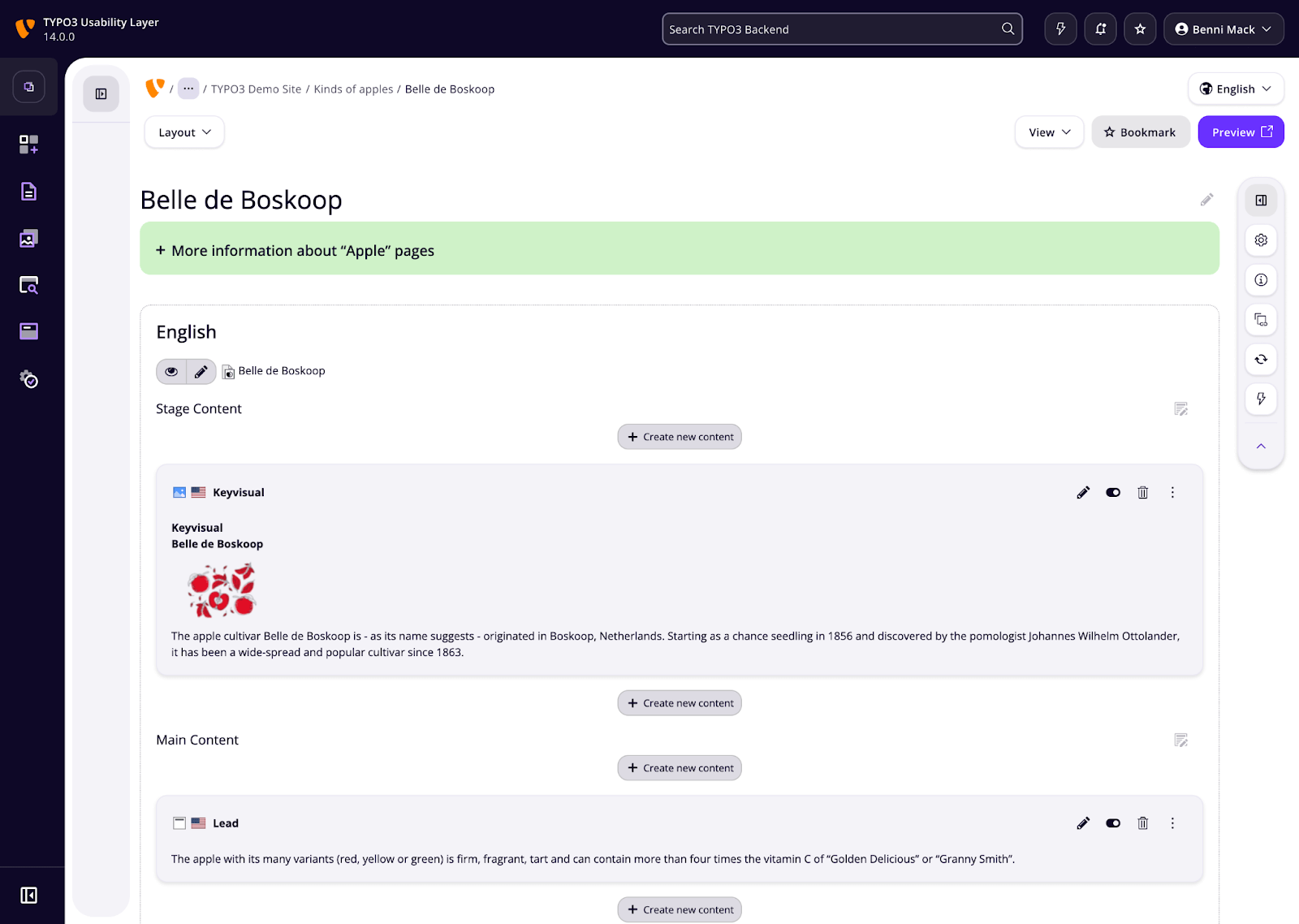
So here’s our vision for TYPO3 14: Make it feel modern, work faster, and let users maintain their context instead of constantly jumping between screens. Most importantly, we’re building an expandable foundation that can grow and evolve for years to come. That’s also in-line with TYPO3’s overarching vision of to covering the broadest range of applications, from small individual solutions to complete product architectures with the TYPO3 product as a base.
We’re aiming to get this into Core by April. And we want to make UX a more visible competence within TYPO3—one of the first things you think about when you recommend the CMS.
Building for Today and Tomorrow
Redesigning a CMS backend is completely different from designing a client website. Client sites have specific requirements, fixed timelines, and defined scope. A CMS backend needs to accommodate whatever anyone wants to build next.
Think about it: Every new feature a developer dreams up, every module someone contributes to the ecosystem, every tool an agency builds—it all has to go somewhere in the interface. Our job is creating a framework flexible enough to handle those future additions while maintaining structure and consistency. No small feat.
This redesign will be laying the groundwork that needs to last through version 15, 16, and beyond. The foundation we build now determines how easily TYPO3 can evolve.
Five Key Changes Shaping the New Backend
The Hierarchy Reimagined
When you open TYPO3, you should immediately understand where things are and how to get to them. But TYPO3 installations vary wildly—some clients have three modules, others have forty.
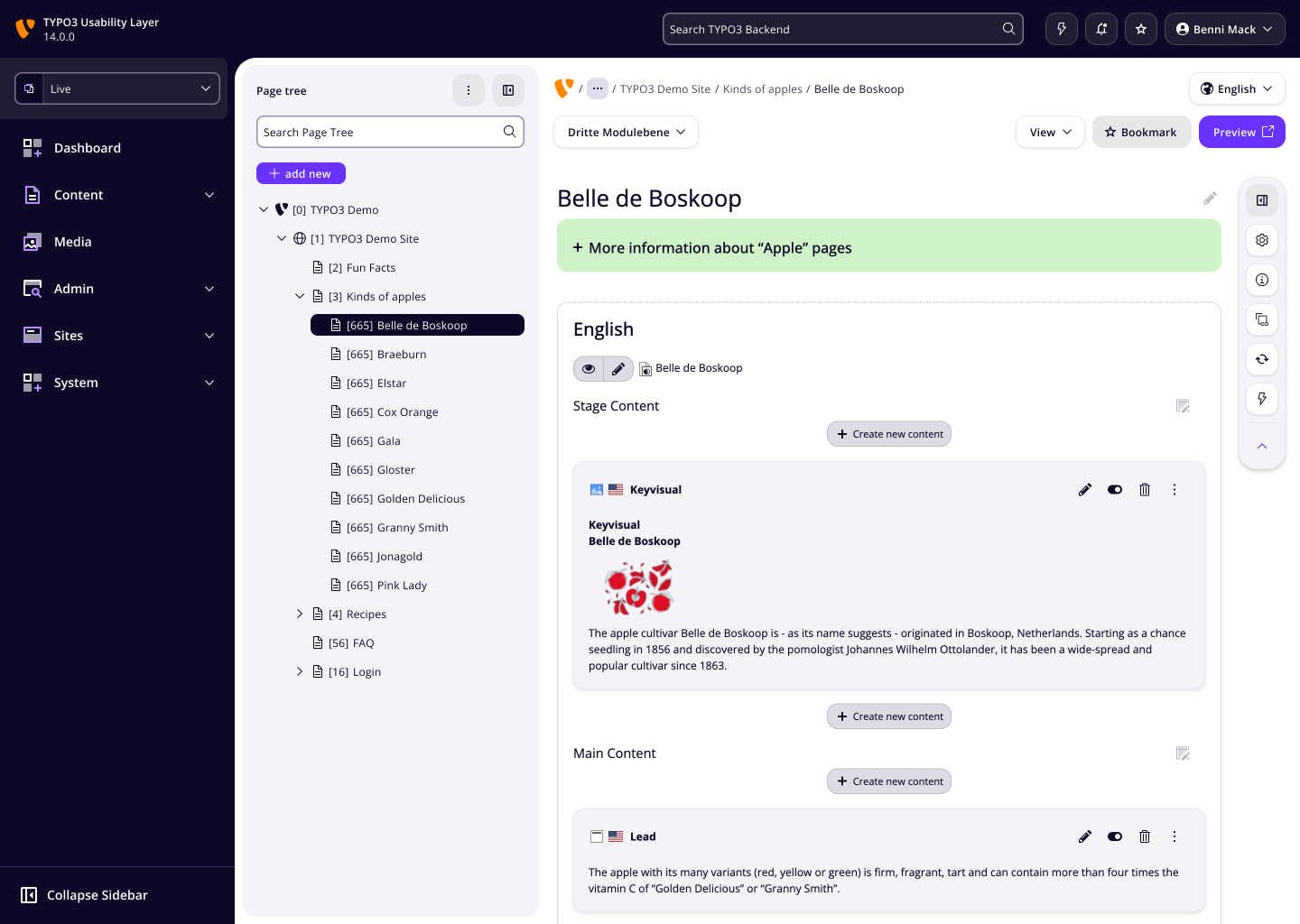
We’re removing the top bar and replacing it with a frame structure that makes the highest-level functions more obvious. The new hierarchy provides a consistent framework for organizing whatever mix of tools and features someone’s installation includes.
A Refreshed Look
When someone evaluates your CMS, first impressions matter. A modern visual language signals that the system is actively maintained and thoughtfully designed.
We’ve decided to change the font from Verdana to Open Sans, and to remove unnecessary visual boxes from icons. We’re also adding rounded corners and updating the overall color palette.
These changes don’t solve functional problems, but they do make TYPO3 look current instead of dated.
Quick Actions for Modern Workflows
We’re adding a context-sensitive strip on the right-hand side of the interface. Depending on what you’re working on, this quick actions panel surfaces relevant tools and options.
This makes the interface feel intelligent and responsive. Instead of hunting through menus for the action you need, TYPO3 presents likely next steps based on your current context.
Page Settings Without Losing Context
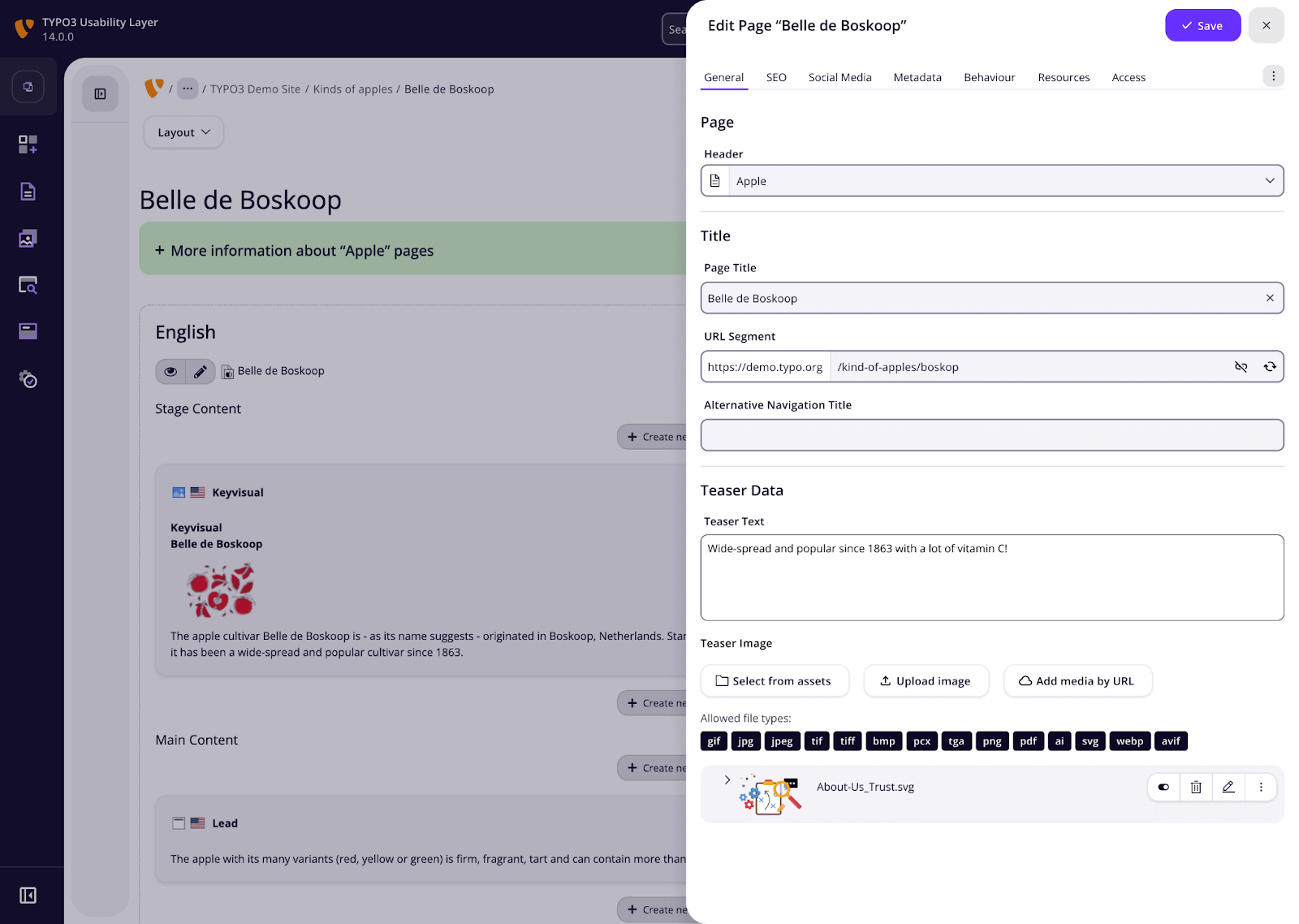
Currently, when you need to change page settings, you navigate to a completely different screen. You lose track of where you were and what you were doing.
In the new design, page settings will open in an overlay. You make your changes, close the overlay, and you’re right back where you started. No context lost, no mental overhead trying to remember what you were doing before.
The Page Wizard
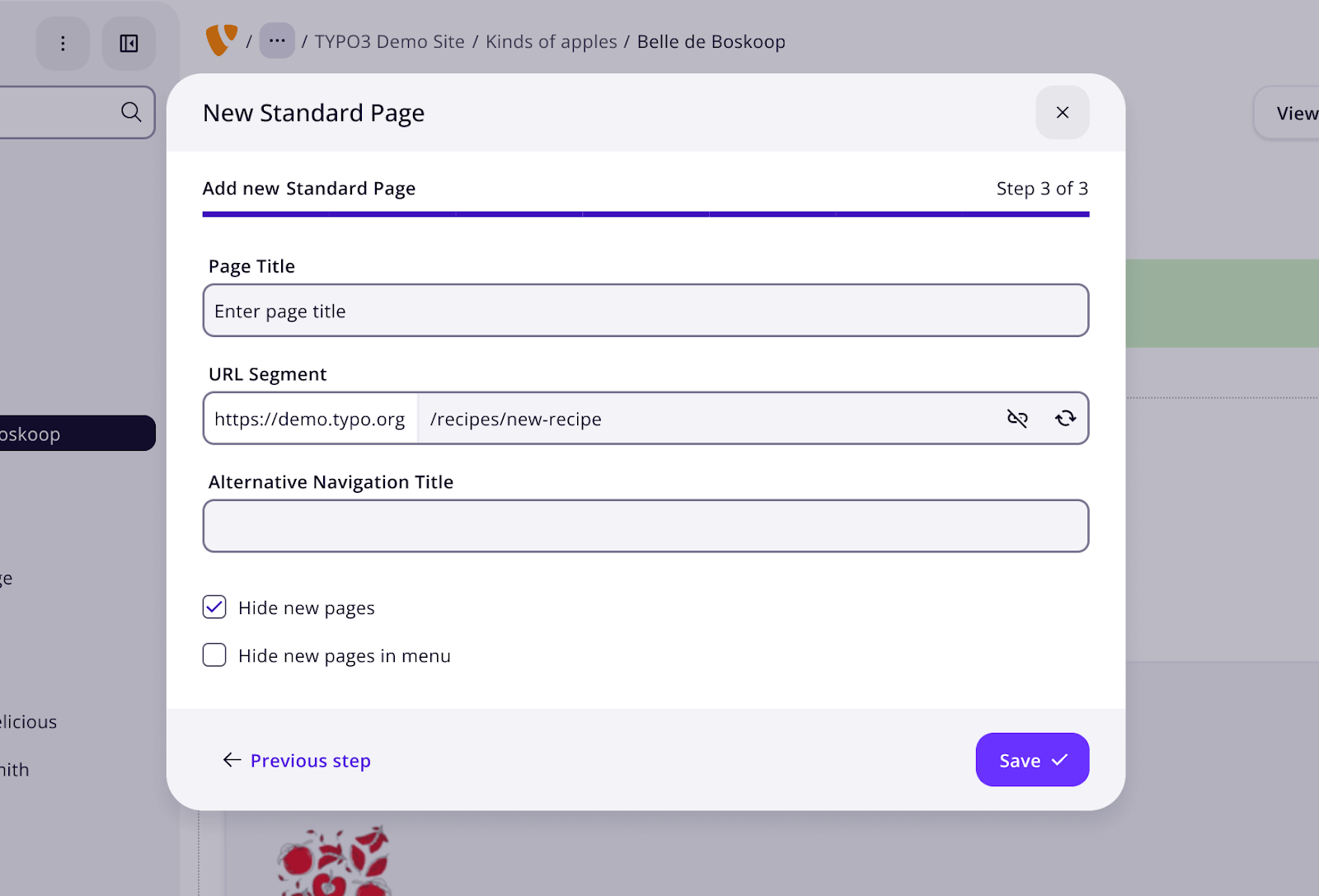
Creating new pages should be straightforward, but TYPO3 doesn’t always give you clear feedback when something goes wrong. Pages that don’t work as expected leave editors confused and frustrated.
The page wizard now walks you through page creation with better guidance and clearer feedback. If something won’t work, the system tells you why and helps you fix it.
Making UX a Core TYPO3 Competence
To date, TYPO3 has been shaped primarily by developers. Developers build features, contribute to Core, and shape the roadmap. Designers rarely get included in those conversations. But we want to change that.
The problem is that developers and editors see completely different interfaces. When you’re a system admin, you have access to every module and function. You see the full complexity of TYPO3. But editors? They typically see a page tree, a file list, maybe a dashboard. That’s it. Working with the development team, I sometimes find myself saying, “No one will ever see that—editors don’t have access to forty modules.”
We’re trying to establish UX guidelines that future feature developers can follow. When someone builds something new for TYPO3, they should have a framework for designing it consistently with the rest of the system. Otherwise, every addition chips away at coherence until the interface becomes a disconnected collection of individually reasonable ideas.
I have big dreams for TYPO3’s user experience. You need a vision to make progress. Some things we want aren’t possible yet, but if we don’t establish where we’re trying to go, we’ll never get there.
What’s Next
We’re targeting April 2026 for Core inclusion. This blog lays out the vision—we’ll follow up with more detailed posts about individual features as development continues. We’ll also put up a working demo on our site so you can see the changes in action.
TYPO3 has powerful features. It deserves an interface that matches that power with equal attention to user experience. That’s what we’re building.
Follow along as we bring it to life.
Want to learn more?
Stay up to date with b13’s blog for detailed breakdowns of each feature, and watch for our working demo coming soon. Contact us to discuss how our TYPO3 expertise can help your project.
Laura personifies the best qualities of her UX work: genuine, to the point, and effective. She gets to the bottom of client needs and turns them into simple, essential interfaces that get the job done right. Her essential tool: Adobe XD
Stop Losing TYPO3 Emails When Your Mail Server Fails
|David Steeb
TYPO3 drops an email that fails to send. It doesn’t retry it, log it, or warn anyone. The Mail Queue extension (mail_queue) still sends emails right away, but it catches the failed…
AI Content in TYPO3: Labelling Needs Accountability
|Benni Mack
The EU AI Act brings the origins of AI-generated content into focus. AI Label marks AI-generated and AI-edited content in TYPO3 and records who signed off the published version—for…
The first TYPO3 Summit North America opened with a keynote that reframes how enterprise teams should think about content management—from platforms to ecosystems, from vendor…
Notes from Atlanta—What the First TYPO3 Summit North America Says About the Next Decade of Enterprise CMS
|David Steeb
Field report from the first TYPO3 Summit North America in Atlanta. On governance that can’t be acquired, predictable seven-year lifecycles, the FAIR distribution layer, and why the…
QR Codes in TYPO3 v14: Built-in Link Management That Just Works for Editors
|David Steeb
TYPO3 v14 adds QR code generation to Link Management. Create codes before URLs are final, track scans via redirect stats, update targets anytime, and avoid third-party tools. Ideal…