
Taming the Page Module Header—Why We Built EXT:page_info_tabs

Anyone who regularly works with TYPO3 installations that use multiple extensions knows the situation: the page module header cn become a growing stack of content from various sources—view statistics, blog metadata, SEO overviews—all rendered one below the other with no visual separation or structure.
With just one extension contributing to the header, everything looks fine. The moment a second or third extension enters the picture, the page module header turns into an unstructured wall of HTML. Finding the information you need means scrolling through content blocks that were never designed to coexist.
This is exactly the kind of small but impactful problem we love solving at b13: a focused, self-contained feature that improves daily editorial workflows without requiring changes to any existing extension. That’s why we built EXT:page_info_tabs.
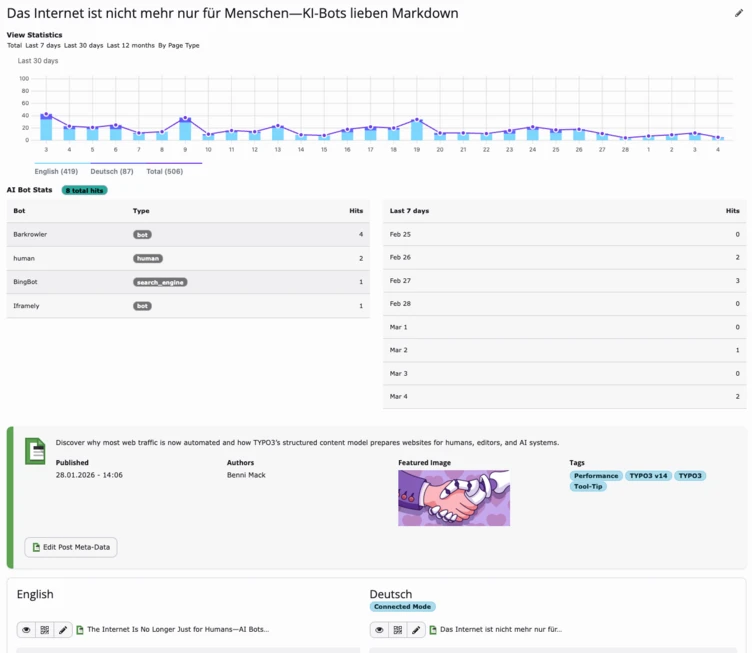
The Problem: A Growing Stack of Unrelated Content
TYPO3 provides a clean mechanism for extensions to add content to the page module header: ModifyPageLayoutContentEvent and its addHeaderContent() method. This is well-designed and works perfectly—as long as only one extension uses it.
The reality in most projects looks different. As soon as multiple extensions contribute content—and they increasingly do—the header becomes a vertical stack of unrelated HTML blocks. There is no built-in way to separate, label, or organize these sections.
In a recent project, we had multiple extensions contributing to the page module header: a blog extension adding post metadata, a view tracker showing page statistics, an SEO tool rendering optimization hints, a translation overview, and custom project-specific information. The result was a header area that required significant scrolling before editors even reached the actual page content.
The core issue is structural: TYPO3 collects all header content into a single output. There is no concept of sections, grouping, or navigation. Every extension simply appends its HTML, and the result is whatever happens to come out.
How EXT:page_info_tabs Works
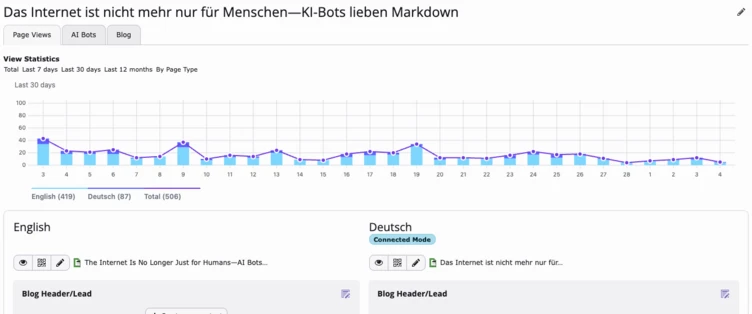
The core idea behind page_info_tabs is deliberately simple: automatically organize page module header content into Bootstrap 5 tabs—without requiring any changes to existing extensions.
The extension works by decorating TYPO3’s EventDispatcherInterface. It captures the content that each ModifyPageLayoutContentEvent listener adds and turns every listener’s output into its own tab. This is the key design decision: no extension needs to know about page_info_tabs. No code changes, no additional event listeners, no configuration in third-party extensions.
The behavior adapts gracefully to what’s actually present:
- 0 sections: nothing is rendered
- 1 section: content is rendered directly, without tabs (no unnecessary UI)
- 2+ sections: Bootstrap 5 tabs, sorted by configurable priority
Tab labels are auto-detected from HTML patterns in each extension’s output. The extension looks for CSS classes like blog-pageheader, tx-ext-key, or data-extension attributes. This means most extensions get a meaningful label right away, without any configuration at all.
Since the TYPO3 backend already loads Bootstrap’s tab JavaScript, no additional JS is needed for tab switching. A small resize-event helper is included to fix chart libraries (Frappe Charts, Chart.js, etc.) that render incorrectly inside initially hidden tab panes. And the most recently used tab is remembered in localStorage, so editors automatically return to their last-used view when navigating between pages.
Designed for Stability With Unknown Third-Party Content
One of the core challenges with this kind of extension is that it needs to work reliably with content from any third-party extension—extensions whose HTML structure, CSS classes, and JavaScript behavior are entirely outside of our control.
This is why we chose the decorator pattern over a more invasive approach. EXT:page_info_tabs does not modify, rewrite, or interfere with the HTML that other extensions produce. It simply wraps each extension’s output in a tab pane. The content inside each tab is exactly what the original extension rendered—untouched.
This design ensures that:
- Existing extensions continue to work exactly as before
- JavaScript initialization in third-party extensions remains intact
- CSS scoping is preserved—no class name conflicts
- If page_info_tabs is removed, everything gracefully falls back to the default stacked behavior
This approach fits our philosophy at b13 for building small, focused extensions: solve one well-defined problem, keep the scope tight, require minimal configuration, and make sure the extension plays nicely with everything else in the system. An extension that organizes third-party content must be especially careful not to break it.
Installation
Installation works as usual via Composer:
composer require b13/page-info-tabs
That’s it. All existing extensions that use addHeaderContent() will automatically get their own tab. No additional configuration steps are required.
Configuring Labels and Priorities
Default labels are provided for known extensions. The auto-detection works well for most setups, but labels and priorities can be customized explicitly when needed.
To customize or add labels, set them in your ext_localconf.php or AdditionalConfiguration.php:
$GLOBALS['TYPO3_CONF_VARS']['EXTENSIONS']['page_info_tabs'] ['labels']['view_tracker'] = 'Page Views';$GLOBALS['TYPO3_CONF_VARS']['EXTENSIONS']['page_info_tabs'] ['labels']['blog'] = 'Blog';$GLOBALS['TYPO3_CONF_VARS']['EXTENSIONS']['page_info_tabs'] ['labels']['my_extension'] = 'My Label';
Priorities control tab ordering (lower value = leftmost tab):
$GLOBALS['TYPO3_CONF_VARS']['EXTENSIONS']['page_info_tabs'] ['priorities']['view_tracker'] = 20;$GLOBALS['TYPO3_CONF_VARS']['EXTENSIONS']['page_info_tabs'] ['priorities']['blog'] = 10;
Finding the Right Extension Key
Each tab panel includes an HTML comment with the detected key. Open your browser’s developer tools and inspect the tab content to find it:
<!-- page-info-tabs key: view_tracker -->
Use that key in your label and priority configuration. The key is auto-detected from HTML patterns in the following order:
data-extension=“my_ext”attribute (most reliable—extensions can add this explicitly)- CSS classes like
my-ext-pageheaderormy-ext-widget - TYPO3 convention classes:
tx-my-extortx_my_ext - b13 JS hooks:
bJS_txMyExt EXT:my_ext/references insrc/hrefattributes
If auto-detection produces an unexpected key, you can either configure a label for that key directly, or ask the extension author to add a data-extension attribute to their HTML output.
Explicit Section Registration (Optional)
Extensions that want full control over their tab label, priority, and content can listen to CollectPageInfoSectionsEvent instead. Explicit sections take precedence over auto-captured content from the same extension.
use B13\PageInfoTabs\Event\CollectPageInfoSectionsEvent;use B13\PageInfoTabs\Model\Section;use TYPO3\CMS\Core\Attribute\AsEventListener;#[AsEventListener]final class MyPageInfoSection{ public function __invoke( CollectPageInfoSectionsEvent $event ): void { $event->addSection( new Section( identifier: 'my-extension', label: 'My Label', content: '<div>Your HTML here</div>', priority: 50, ) ); }}
This API is intentionally straightforward: a single event, a simple value object, and clear precedence rules. Extension developers can adopt it in minutes.
Conclusion
EXT:page_info_tabs is a small extension that solves a real everyday problem in the TYPO3 backend. It takes content from any number of third-party extensions—content that was never designed to coexist—and organizes it into a clean, navigable tab interface.
What makes this extension particularly useful is what it does not require: no changes to existing extensions, no complex configuration, no custom JavaScript. Install it, and the page module header is instantly organized.
This is exactly the kind of extension we believe in at b13: focused on a single, well-defined problem. Small enough to be fully maintainable. Stable enough to work reliably with content from unknown third-party sources. And designed to simply work out of the box while remaining configurable when needed.
Documentation and source code are available on GitHub:
Curious to Learn More?
In larger TYPO3 installations with many extensions contributing to the page module, a structured header makes a noticeable difference for editorial workflows.
If you need support introducing EXT:page_info_tabs or integrating it into an existing TYPO3 project, feel free to get in touch with us.