
Mail Queue—No Email Gets Lost Again
When your mail server hiccups, TYPO3 silently drops the email. One line in the log, and no second chance.
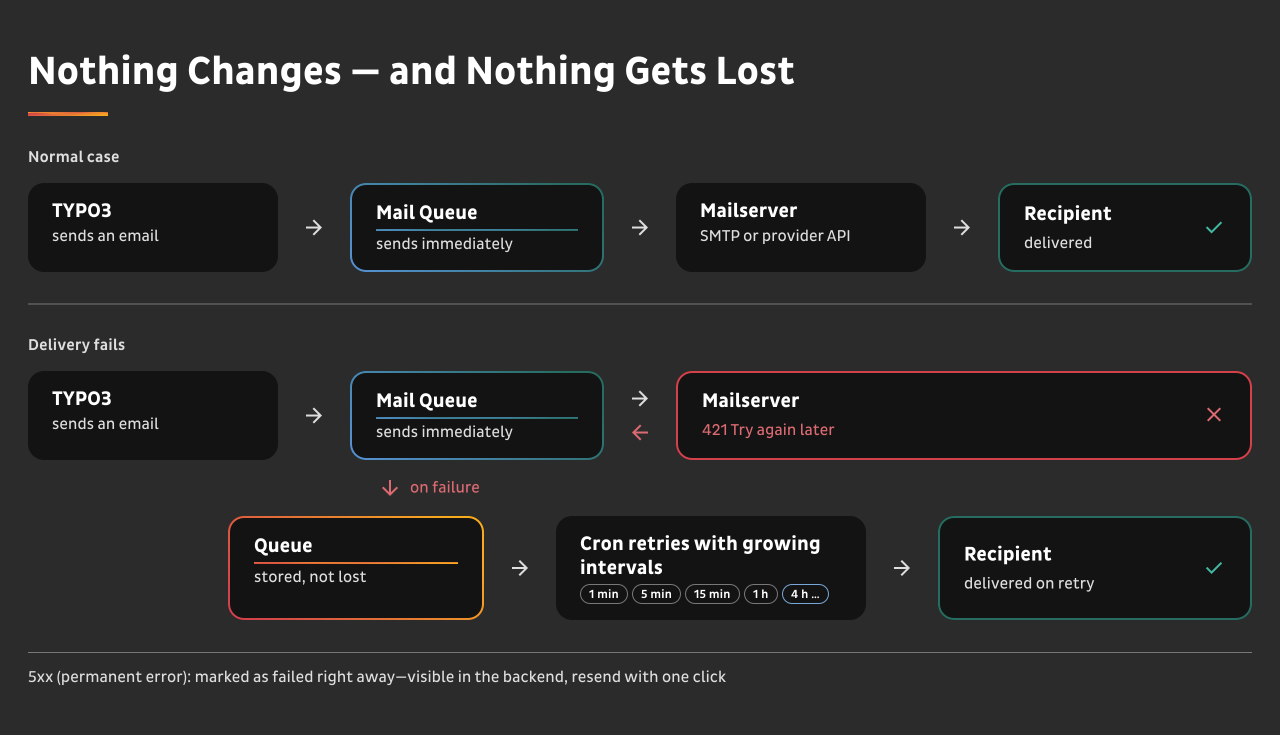
Mail Queue sends every email immediately, exactly like before. Only when a delivery fails does it step in: the email goes into a queue and gets retried with growing intervals until it’s out. This happens at transport level, so every email TYPO3 sends through its configured mail transport is covered—your extensions, the form framework, password resets. Without a single line of code changed.
The Problem
TYPO3’s built-in spool does not do what most teams assume it does.
With MemorySpool—the default—a failed email gets three more attempts, half a second apart, and then it’s gone. All of that happens inside the same request, in the destructor of a singleton. If your mail server is unreachable for two seconds, the email does not exist anywhere anymore. What’s left is a single log line with the exception: no recipient, no subject, no content, and no way to send it again.
With FileSpool, a failed email is renamed to a .sending file and stays there. Later flush runs don’t pick it up—it waits until someone triggers the spool’s recovery, which nothing does on a schedule by default. The exception also ends the current flush run, so the rest of that batch waits for the next one.
Neither one counts attempts, neither one distinguishes a temporary problem from a permanent one, and neither one tells you that something went wrong.
The failure mode is quiet. Google answers with 421 4.7.0 Try again later, your SMTP host rate-limits you for 30 seconds, your provider’s API times out—and the registration email is simply never sent. Nobody notices until a customer calls.
Before Mail Queue, a problem like that wasn’t visible at all. Now we have the full picture whenever a technical problem comes up again.
“We send through Postmark, they handle retries.”
They handle the second half. Every SaaS provider retries the leg from provider to recipient—after they have accepted your email. If your TYPO3 instance can’t reach the provider in the first place, because of a network error, an API timeout, an HTTP 429, or a provider outage, the email was never accepted and exists nowhere. The SMTP specification puts the retry duty for a transient failure on the sending client. In the PHP and TYPO3 world, almost nobody takes it.
Mail Queue is not an alternative to your provider. It’s the missing half in front of it.
How It Works
Three lines of configuration, and nothing about your normal day changes.- Every email is sent immediately. No spooling, no delay, no behavior change. Your code doesn’t know Mail Queue exists.
- A failed delivery goes into the queue instead of disappearing.
- A cron job retries it with growing intervals—one minute, five, fifteen, one hour, then every four hours, up to 20 attempts over about 61 hours.
- Temporary and permanent failures are told apart. A 4xx response gets retried. A 5xx response is marked failed right away, because retrying a rejected address only wastes time.
- You see all of it in the backend, and you can send an email again with one click.
Because Mail Queue works at transport level, it covers everything that goes through TYPO3’s mail transport: extensions you wrote, extensions you didn’t, the form framework, felogin password resets. No code changes and nothing to do per extension.
Almost every maintained extension uses the TYPO3 mailer—it’s the documented way and has been for years. For the few that bring their own sending mechanism, and for bulk mailers, see the FAQ.
What You Get
See What Happens to Your Email—Before Your Customer Calls
“Did the confirmation email go out?” is the support question nobody can answer quickly. With Mail Queue you open the backend module and see subject, recipient, content, and status. You send the email again with one click, and if the address was typed wrong, you correct it and deliver to the corrected address without regenerating anything.

Alerting That Doesn’t Take the Same Route as the Problem
When the queue turns red, a webhook tells you—not a warning email. An alert that travels the same path as the failure is not an alert: if SMTP is broken, the warning email never arrives either. The webhook payload works with Slack, Teams, or your own receiver, and a traffic light widget on the TYPO3 dashboard shows the state at a glance.
Staging Can’t Email Your Real Customers
The hold for “this environment must never send email” lives in your deployment configuration, not in the database. The next production dump onto staging cannot silently lift it.
That matters, because the two usual alternatives each have a catch. A switch inside the CMS—Drupal’s reroute_email, Magento’s debug mode—is stored in configuration that typically lives in the database, so a production dump carries production behavior straight into staging. Catching everything with a separate SMTP sink like Mailpit is dump-proof, because you change the transport instead of a database row, but it needs a service running alongside your application, and the emails then live outside TYPO3—so whoever has to answer “was this sent, and what did it say?” has to look somewhere else.
forceHold gives you the dump-proof safety of a transport change without a second service. Everything stays queued, visible in the backend, and scoped per tenant.
One SMTP Account per Tenant, Correct Even in the Retry
If you run several tenants on one instance, each one sends through its own SMTP account—and it stays correct in the CLI retry, where there is no request and no site context. Credentials stay in your deployment configuration and never touch the queue table. Delegated editors see only the emails of their own site, enforced server-side.

Your Testers Verify Email in the Backend They Already Know
Turn on forceHold on staging or integration and nothing leaves the server—but everything is still there. Project managers, QA, and your client can fill in forms, trigger registrations, run through a booking flow, and then check the actual email in the same TYPO3 backend they were just working in: subject, recipient, full content, headers.
No platform switch, no extra container to run, no second tool to document, and nobody has to be trained on a system they’ll use twice a year. For an acceptance test with the client, that’s the difference between “let me get you a login to our mail catcher” and “look in the module you already have open.”
And it costs nothing extra: staging, test, and local installations are license-free.
Your Email Survives Intact—Attachments Included
A queued email is kept whole: recipients, subject, headers, body, and every attachment. Attachments are written to disk rather than into the queue table, so a 12 MB PDF doesn’t bloat your database—and the retry sends the same file, not a regenerated one. When you resend from the backend weeks later, the customer gets what you sent the first time.

An Archive, if You Want One
Turn on archive mode and every sent email is kept with its content until the retention removes it. That answers “was this sent, and what did it say?” for good—and it lets you resend from the module. Retention is staged and configurable: 30 days for sent, 90 for failed, 14 for attachment payloads on disk.
Archive mode and personal data. Archive mode stores the content of your emails, and that content is usually personal data. It’s off by default, the retention is yours to set, and the module can be restricted to trusted users. Whichever way you configure it, mention the retention in your privacy notice.
Compared to What You Have Today
| TYPO3 core spool | Mail Queue | |
|---|---|---|
| Sends immediately in the normal case | no—always spools | yes |
| Retry counter | no | yes |
| Exponential backoff | no—MemorySpool tries 3× at 0.5s, in one request | yes |
| Tells 4xx and 5xx apart | no | yes |
| Gives up after n attempts | no—unlimited | yes |
| Recovers a stuck send | manual spool recovery | automatic, on a schedule |
| Backend visibility | no | yes—delegable, tenant-aware |
| Resend from the backend | no | yes |
| Alerting | no | webhook plus dashboard widget |
| Multi-transport routing | no | yes |
| Keeps attachments through the retry | no | yes |
The difference shows up after a delivery fails. Other free TYPO3 extensions queue email, and the closest of them hook into the mail transport and send immediately—the same two things Mail Queue does before anything goes wrong. What they do next is record the failure and wait for someone to notice.
Mail Queue retries on a schedule until the message is out, tells a temporary failure from a permanent one, alerts you over a channel that does not depend on the mail server, keeps each tenant on its own SMTP account through the retry, and lets you hand the queue to an editor without handing over the instance. That combination is what Mail Queue is for.
If your team is thinking about building it: the queue itself is a weekend. The backoff curve, the 4xx/5xx distinction, attachments stored outside the docroot and reused on every retry, an operable backend module with server-side permissions, the right sender account inside a stateless CLI retry, and an alert that doesn’t travel over the broken mail path are not. That is a dozen parts to get right once and to port with every TYPO3 major.
Who This Is For

TYPO3 agencies with maintenance contracts. Every email incident is support time you either can’t bill or have to explain: the report comes in, someone reads logs, reconstructs what happened, resends by hand, and writes back to the client. With Mail Queue the same incident is a look at the module and one click—and the client usually never files it, because the retry already delivered.
The webhook usually gets there first: you hear about the queue turning red before your client hears about the missing email. And the module can stay out of sight—leave the permission unassigned and it is yours alone, invisible to the editors working in the same instance.

Teams running transactional sites. Portals with logins, shops, membership areas, application processes, course bookings. A password reset that doesn’t arrive is a support call. A registration confirmation that doesn’t arrive is a lost user. An order confirmation that doesn’t arrive is a complaint.

Operators of several tenants on one instance. Municipal utility groups, university networks, franchise systems, agencies with multi-site setups. Each tenant keeps its own sender account—so a retry three hours later still leaves from the right address, and an editor of one site never sees another site’s email.

Enterprise and public sector IT. Email is part of an operational process, and an outage is an incident with a reporting path. Webhook integration into your existing ops stack, graded permissions, tenant scoping, defined retention for personal data, and a clear compatibility commitment for v13.4 LTS and v14. The backend module ships in English and German, and every label can be overridden per installation—so the people who have to operate the queue read it in their own language.
Running in Production
Mail Queue runs on several client websites, such as on the booking platform for Technische Akademie Esslingen (TAE) and our own b13.com. It delivers the license emails for the b13 Marketplace: we use it where a lost email would block a paid purchase.
Mail Queue also works as an early warning system.
System Requirements
- TYPO3 v13.4.23 or later, or v14
- PHP 8.2 or later
- A cron job running every minute for retries and webhook health
- A daily cron job for retention cleanup
- A persistent, writable
var/directory for attachment payloads - Optional:
typo3/cms-dashboardfor the traffic light widget, and an HTTP endpoint for webhook alerts
Mail Queue works with any Symfony Mailer transport TYPO3 supports—SMTP, sendmail, or a provider API—and stays compatible with mailer:spool:send.
Installation
Composer, through the b13 Marketplace—the recommended way. After purchase your account holds a Composer repository of your own. Two commands, credentials in auth.json, and updates arrive like any other package.
1
2
composer config repositories.b13 composer https://b13.com/_api/composer/p/<your-project-key>/
composer require b13/mail-queue
Or a ZIP, if your setup has no Composer access to external repositories—the download sits in your account, and you update by replacing the folder.
Either way, three lines of configuration follow, and mailqueue:send-test proves the chain works in under a minute. The documentation has the details, including the cron jobs and the settings for staging.
Updates and Maintenance
What we commit to. Mail Queue supports the current TYPO3 LTS within eight weeks of its release, and keeps supporting the previous LTS until its regular end of life. Right now that means v13.4 LTS and v14, both from the same package—no separate branch to pick, no migration when you upgrade TYPO3. When a version reaches the end of our support, you read it in the changelog before it happens, not after.
Why we’re quick about it: we’re a customer too. Mail Queue delivers the license emails for the b13 Marketplace—the message that carries your Composer credentials. If that one gets lost, somebody paid us and received nothing. It also handles the email on b13.com. We’re not maintaining this for a market we watch from the outside: we hit the rough edges in the same week you would, on the same TYPO3 versions, and a patch level that breaks something breaks it for us first.
Every release is in the public changelog with a date. No license needed to read it.
Pricing
One price, everything included.Mail Queue is licensed per year and per production instance—one TYPO3 installation, one codebase, one database. How many sites, tenants, or sender accounts run inside it does not change the price. Staging, test, and local installations of the same project are covered by it.
5 Production Instances
10 Production Instances
The 5- and 10-instance tiers are arranged with us directly—tell us how many production instances you run and we set the license up for you. Everything on this page is included at every tier.
What “everything included” means. Send-first, exponential backoff, 4xx/5xx handling, the backend module, archive mode, forceHold, webhook alerting—and one SMTP account per tenant, correct even in the CLI retry, with tenant-scoped access and graded permissions. Unlimited sites, unlimited sender accounts. No feature on this page sits behind a higher tier.
One build, one price. Multi-tenant sending is the hardest thing this product does, and every license carries it—there is no edition that unlocks it later. If you need more from us, that is a support level, not a different build.
Why a yearly license. TYPO3 patch levels and security releases keep coming, and Mail Queue has to stay current with them—it runs in your delivery path every day. That is what the year buys.
For procurement departments that can’t process a yearly subscription: a multi-year term paid in advance, at a small discount—three years of Mail Queue for €1,320 instead of €1,470. One invoice, defined end date.
30 days money back. Run it in production for a month. If it doesn’t earn its price, tell us and we refund it—no conditions, no forms.

Florian “Flix” Keitgen
Product Development
Support
Every license includes email support, bug fixes, updates for new TYPO3 versions, and security fixes. One inbox, one queue. Requests that stop your operation get pulled forward. You get a ticket reference and can ask for the status at any time.
Priority—€300 per year per license. A guaranteed reply within one business day and prioritized bug fixes.
Enterprise—from €990 per year. Response times agreed by severity, a defined availability window, an escalation path, and an annual review. Individually contracted.
What support does not cover: installing and configuring it in your project, adapting it to your specific case, debugging your own code or environment, data cleanup, and training. We diagnose for up to an hour per request; if the cause turns out to be outside Mail Queue, we tell you what we found and where to look.
Mail Queue runs in your instance, so there is no uptime to commit to—what we commit to is when we answer.
Security reports go to [email protected]. We read every report and reply with an assessment, and we agree a disclosure date with you before anything is published. If your own disclosure process needs a fixed date, say so in the report and we will agree one.
FAQ
Does Mail Queue delay my emails?
No. In the normal case it sends immediately, exactly as before. The queue only holds emails that failed to send.
We already use Postmark, SendGrid, or Mailgun. Do we need this?
Yes, for a different part of the path. Your provider retries delivery to the recipient after accepting your email. If your instance can’t reach the provider, the email was never accepted and no retry exists. Mail Queue covers that gap.
Does it cover emails from extensions we didn’t write?
Every email that goes through TYPO3’s mail transport, yes—including the form framework and felogin password resets, and without any code changes. That is the documented way to send email in TYPO3, and almost every maintained extension uses it.
What it cannot cover is an extension that goes around the mailer: one that calls PHP’s mail() directly, bundles its own SMTP library, or talks to a provider API itself. No transport-level solution can catch those, because they never reach the transport. Two more things stay outside: email sent from outside TYPO3 altogether, such as a cron script or your host’s MTA, and a PHP fatal error that hits before the transport is reached.
How do we find out whether an extension goes around the mailer?
Search the extension’s code for MailMessage or MailerInterface—if it uses either, it’s covered. If you find mail(, PHPMailer, or a provider SDK, it isn’t. We’re building a command that does this for your whole installation; until it ships, ask us and we’ll tell you what to look for.
What about Direct Mail and other bulk mailers?
Check yours specifically: bulk mailing extensions differ in how they send—some use TYPO3’s mailer, some bring their own mechanism, and it varies by version.
And even where a bulk mailer does use the transport, you probably don’t want a newsletter run in a retry queue: a send to 50,000 recipients would put 50,000 rows and their payloads into the queue on a bad day, and a newsletter that arrives two and a half days late is worth less than one that doesn’t arrive. Mail Queue is built for transactional email—the confirmation, the password reset, the offer—where every single message matters and where a retry window of that length is exactly right. Talk to us about your setup before you assume either way.
Is the backend module available in German?
Yes, in English and German out of the box. If you need another language, or want to reword a single label for your editors, you override it per installation through locallangXMLOverride—no fork, no patch.
Is the content of our emails stored?
Only what the retry needs, and only as long as it needs it. Attachments are written to disk instead of the database so a large file can’t bloat the queue table. With archive mode turned on, sent emails are kept with their content until the retention removes them—that’s a deliberate choice you make, and the retention is configurable.
What happens when the license expires?
Your running installation is unaffected—the code on your server keeps working, and nothing switches itself off. What ends is access to the releases: our Composer repository stops serving you new downloads.
One thing to know about your pipeline.
If your deployment runs composer install against our repository on every build, that build will fail once the license has lapsed. Your production site keeps running, but your next deploy doesn’t. The code is GPL-2.0-or-later, so the copies you already hold remain yours to keep.
And this is why there’s a grace period: if a payment fails, you keep pulling for another 13 days while it gets sorted out, so a card that expired on a Friday doesn’t break a deploy on Monday. We also remind you twice before the license runs out.
Is it open source?
The code is GPL-2.0-or-later, like every TYPO3 extension. What you pay for is access to the releases, updates for new TYPO3 versions, security fixes, and support. You can read every line.
Do we need a license for staging and test systems?
Your production license covers them. Staging, test, integration, and every local installation of the same project are included—only production instances are counted.
What counts as one instance?
One TYPO3 installation—one codebase, one database. Everything inside it is covered: any number of sites, tenants, and sender accounts. Ten customer sites in one multi-site installation are one instance. Ten separate installations are ten—talk to us, that is what the volume tiers are for.
Can editors see every email in the instance?
Only if you let them. Deleting and the instance-wide hold need their own permissions, and with multi-site setups a delegated editor sees only the emails of their own site, enforced server-side.
Can we try it first?
Run it in production for 30 days and get your money back if it doesn’t earn its price. mailqueue:send-test proves the whole chain works within a minute of installing, and from there you are testing it against your real mail traffic—which is the only test that tells you anything about a retry queue.
What if we’re already using a spool?
Mail Queue stays compatible with mailer:spool:send. Migration is a configuration change.
Ready to Stop Losing Emails?
Mail Queue installs in an afternoon and pays for itself the first time it catches an email you didn't know was at risk.