Your Code, Our Review: How We Work With In-House IT Teams


Some of our clients make changes to the code of their TYPO3 site themselves. We review every one of them before it goes live. Here’s how that works—and why it’s good for both sides.
A few weeks ago, I wrote about a roundtable on digital sovereignty at Open Source CMS 26. Near the end, I mentioned that we’ve been teaching client IT teams to work on their own TYPO3 sites for years—and that we’ve never written about how we do it. This is that post.
Two Setups That Don’t Fit Every Team
You probably know the two usual setups between an agency and a client with its own IT department.
Everything goes through the agency. Every new template variant, every label change, every small fix becomes a ticket. The ticket waits in a queue, gets estimated, gets scheduled. The IT team knows exactly what to change and could do it in twenty minutes, but they’re not allowed to touch the code. Often they couldn’t even if they wanted to: the code lives in the agency’s repository, and the IT team has no access to it. To be clear: this setup is perfectly fine. If you don’t have an IT department, or you deliberately don’t want anything to do with the code, handing it all to the agency is a valid choice, and many of our clients work exactly like that. It only becomes a problem when there’s a capable IT team that wants to do more and isn’t allowed to. Then it’s slow, it’s expensive for small things, and the people who could learn the system never get the chance.
The IT team takes over. At some point, the client’s IT team gets frustrated with the process, or it simply gets too expensive, and the site moves from the agency to the IT department. Now they can do whatever they want. But running a TYPO3 site takes more than making changes: someone has to apply patches, plan upgrades, and keep up with how things are done today. Most IT departments aren’t set up for that. Why this is a bad idea: nothing breaks right away. The system just drifts, one shortcut and one workaround at a time, until it looks a lot like the one an agency was called in to clean up and stabilize the last time.
There’s a third way, and it’s not new. It’s how we work inside our own team.
The Core Idea: Same Workflow, One More Team
At b13, no change goes live without a second pair of eyes. Every developer works in their own branch, tests locally, and opens a merge request. A colleague reviews it, and only then does it get merged and deployed automatically.
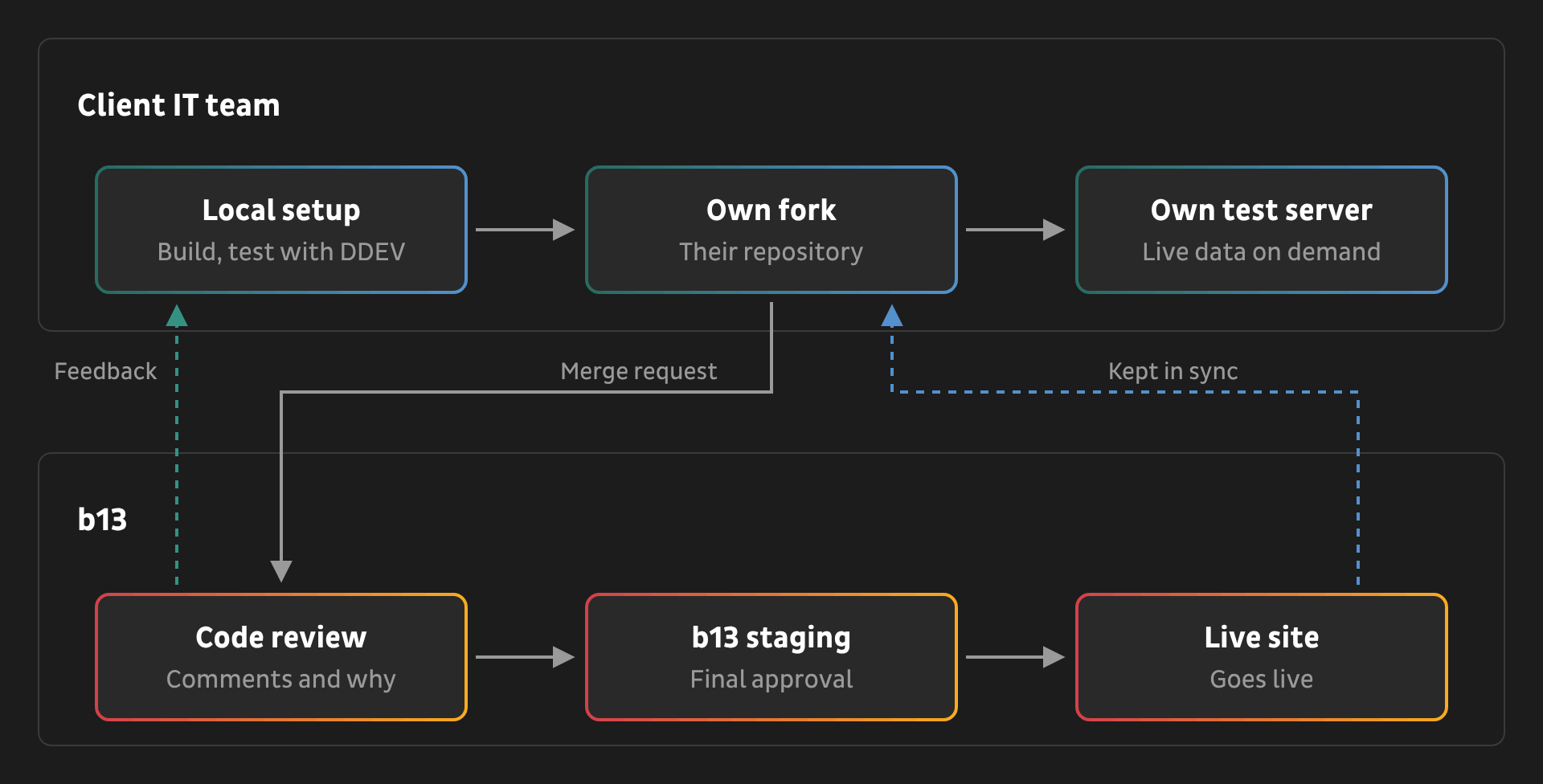
The core idea is simple: the client’s IT team gets exactly the same workflow. They become one more team in the project, with their own space to work in. We stay responsible for the integrity of the code base, because nothing reaches the live site without our review.
Here’s what the client team gets:
- Their own repository, a fork of ours. We keep it in sync with everything we put on the live server, so they always work on the current state.
- Their own test server. Every push to their repository deploys automatically to a staging server that only they use. We don’t touch it.
- Live data on demand. They can pull a copy of the live database and files to their test server whenever they want, so they test against real content.
- A local setup with DDEV, configured like the live system, if they want to work on their own machine.
- A way back. Every change is a Git commit, so anything that doesn’t work out can be reverted. That’s simply how Git works.
How a Change Goes Live
So here’s a step-by-step look at a typical change, say a new variant of a content element:
- The client developer creates a branch, builds the variant, tests it locally with DDEV, and commits it.
- They push it to their own repository. Their test server rebuilds automatically.
- They test it there with live data, and their editors can look at it, too.
- When they’re happy, they open a merge request from their fork into our repository.
- One of our developers reviews the code. If something should be done differently, we say so and explain why.
- Once the code is right, we merge it. It deploys to our staging server and goes to the live site once it passes final approval.

One thing to be clear about: in the review, we check the code, not the feature. Does it follow TYPO3 best practices? Does it fit the rest of the project? Will it survive the next upgrade? Whether the new variant does what the marketing team wanted is something the client tests on their own server. That split keeps the reviews fast.
Not every team needs the full setup, either. For simple template, CSS, or label changes, editing files directly in GitLab in the browser is enough—no local environment, no command line. Teams that build bigger features get full Git access and the complete DDEV setup.
The Review Is Where the Learning Happens
We don’t just approve or reject a merge request. We comment directly on the lines of code we’d change, and the client’s developers can reply and ask questions right there.
When we write “we’d do this differently,” we also write why. Maybe there’s a core API that does the same thing in one line. Maybe the TypoScript works but will be hard to find in a year. Maybe the change fixes the problem in one place but causes new ones elsewhere in the project, say on another site in a multisite setup. That’s hard to see when you only look at your own corner of the code. Maybe it’s a pattern that made sense in TYPO3 v8 and has a much better replacement today. Every review is a small lesson, and the next merge request is usually better than the last one.
BRAND has worked with us this way since their relaunch in 2020. Their Senior Developer David Herber described it like this: “I was very impressed with the high frequency of feedback—the large number of iterations helped me learn fast. There was lots of teaching, calling back, saying this is not how we do it—all very interesting and helpful.” Since then, more than 750 changes from BRAND’s team have gone through our review and been merged into the live site.
[T]he large number of iterations helped me learn fast. There was lots of teaching, calling back, saying this is not how we do it.
And it’s not only end clients. We work the same way with partner agencies that know frontend development well but don’t work with TYPO3 every day. We set up and run the TYPO3 system. They adapt the frontend templates. And in the reviews, we pass on what we know about TYPO3.
Why We Don’t Mind Making Ourselves Less Necessary
The obvious question: if we teach the client everything, why would they still need us?
Fair question. Here’s my answer. BRAND used to run their TYPO3 site on their own. The team was capable, but they lived in their own bubble. If you only ever see your own system, you do things the way you’ve always done them, because that’s the only way you know. Nobody tells you there’s a better way now.
We work on many TYPO3 projects and contribute to the TYPO3 Core. That’s the outside view an in-house team can’t have on its own. So the client doesn’t need us for every small change anymore—and that’s the point. They need us for the bigger features, for the architecture, for upgrades, and for someone who keeps an eye on the whole system.
It also keeps the relationship honest. A client who can make changes on their own and understands their code base isn’t locked in. If they stay with us, it’s because the collaboration works, not because they can’t leave. That’s the kind of independence we want our clients to have.
So, Is This for You?
Not every client needs this, and that’s fine. If you’d rather we take care of everything, we will. But if you have developers who want to work on your TYPO3 site, this is how we make it work: they make the changes, we review them, and nothing goes live without a second look. Your team learns something with every merge request, and the site stays in good shape.
Does your IT team want to work on your TYPO3 site—with someone reviewing their work?
