


More Than Professional Growth
Takeaways from CMS Camp 2026 in Mallorca: visual experiences, SEO and GEO, working with AI, and inclusive design. Plus a look at what editors need from a CMS, and why their…
Read more: More Than Professional Growth
The TYPO3 Core Team works tirelessly to improve the day-to-day lives of admins and editors who work in the TYPO3 backend. Since TYPO3 V9, they’ve added many helpful, out-of-the-box features, like full control over SEO metadata. But did you know that you can now customize the TYPO3 backend to meet your needs?
If you’re worried that editing or administering your website has gotten too complicated, it’s worth checking out TYPO3’s latest updates. As of v9, you can create a great working environment for your authors and editors by customizing your TYPO3 CMS backend.
You have lots of options when it comes to tailoring the TYPO3 backend to your editor’s or admin’s needs. Here are a few of our favorites, based on client projects—and our own experiences—over the years.
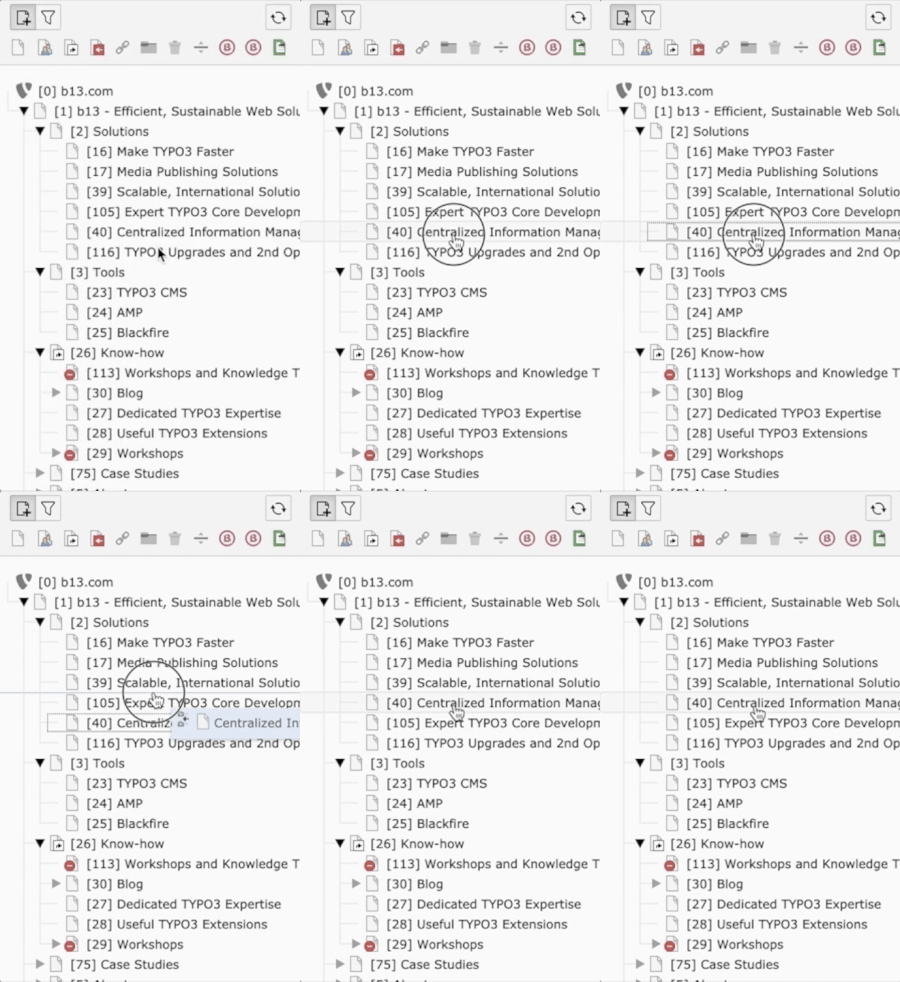
The page tree in TYPO3 shows the information Architecture (IA) of your installation. You can easily add or rearrange pages by drag-and-dropping them within the page tree. The structure and order of the page tree are also used to build the menu in the frontend—so if you would like to add, change or remove a menu item, you don’t need a developer’s help.
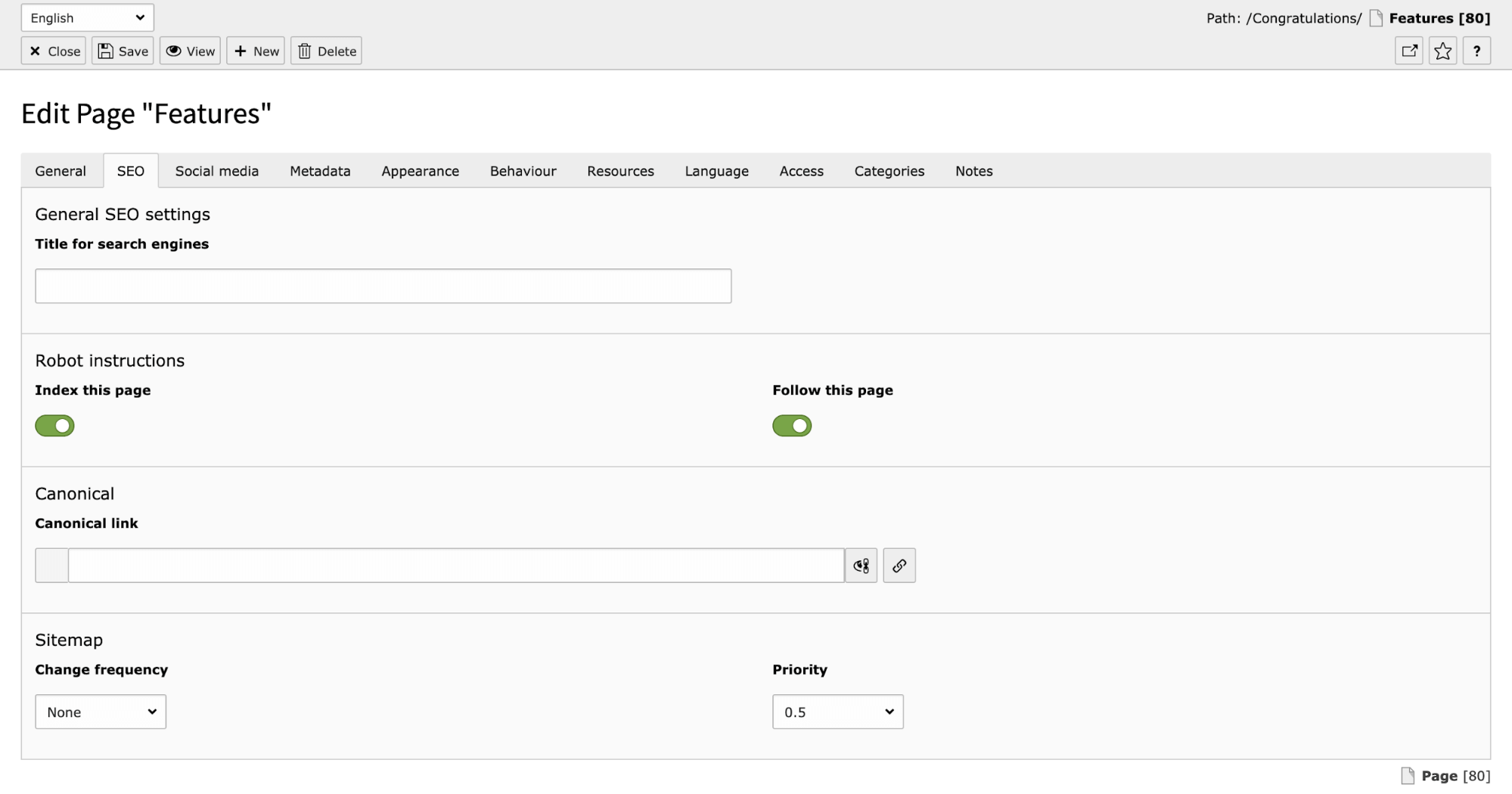
Relevant, up-to-date metadata is very important for your website’s search ranking. In TYPO3 v9 we added an SEO Tab to Page “Features”, so you can set and update your metadata on the TYPO3 backend. You can also disable search crawler indexing altogether.
Eliminate the guesswork around what will appear in social media teasers when you post the page to platforms like Facebook or Twitter. You can compose social media messages ahead of time, as a part of your content creation and approval process.

TYPO3 CMS gives you full control of your site URLs, another important aspect of usability and SEO optimization. By default, the URL—also called the “slug”—is set by the structure and position in your site’s IA (hello, page tree!) and the title of the page, like this:
You can replace the default slug generation pattern to match your specific needs. You can also always manually overwrite the URL for any given page. You can also update your links‘ settings so that when a visitor clicks on a link, the target opens in a new browser window (rather than navigating away from the page).
Admins can give editors access to the Redirects module in the TYPO3 backend. This helps you avoid the ghastly 404 “page not found” error that kills your search engine ranking, as your site structures, slugs, and page names change over time. TYPO3 gives you full control over source, destination, and type of redirect (301, 302, 303, 307).
As an admin, you can create as many users as needed. But the more you have, the more cumbersome and error-prone user access rights become. “Who can edit pages?” is a really complicated question! This presents some obvious additional security risks, too. “Did I remember to give a new editor access to everything she needs? Did I remove all the right permissions when he changed jobs?”
The solution is to group users with the same role—news editors, forum moderators, etc.—into user groups and define their access rights based on their jobs or tasks. In the case of a “news editor” user group, users should only be able to access and edit news pages, content elements used in news items, and the corresponding part of your website’s file system.
For some other great features, you’ll need help from a developer—but they’ll make your daily work in the TYPO3-Backend much easier. Ask your friendly TYPO3 dev to help you with these, too!
The sky’s the limit when it comes to customizing your TYPO3 content elements. You can define their data fields (of course!) and labels. You can also write help texts for a content element, so the editor knows exactly how to use it. (We find this especially helpful for rarely-used content elements.) TYPO3 also allows for previews, so you can see the content arranged at a glance.

When it comes to images and visual assets, you have to watch out for aspect ratios on different screens. In TYPO3 you can define an aspect ratio for each screen size and choose the correct display details within the element.


Once you set up your multilingual TYPO3 site, adding and editing translations is a breeze. You can assign targeted access and editing permissions by language for both translators and reviewers. When b13 worked on d&b audiotechnik’s site, for example, we had to manage translation permissions for both globalized and region-specific, localized content.
Extensions like l10nmgr allow you to export language files formatted for translation agencies‘ translation software (across, DéjàVu, memoQ, various SDL TRADOS products, etc.). After your content is translated, you can reimport the updated files back into TYPO3 and publish the new and translated content on your website.
Some of your manual recurring tasks can be replaced with a customized backend module. The amount of effort worth investing in the module will depend on how frequently the task comes up or the potential savings involved in reducing errors, frustration, and support calls.
Here are two examples of problems solved by backend modules:
As a useful rule of thumb, a good backend module saves your editors time, rather than create more work.
We hope this post got you excited about the possibilities of setting up a simple, purpose-built backend for the people who work on your website every day. While TYPO3 comes with plenty to love out of the box, you can make it even simpler and easier for your editors with a few customizations.
As people who live and breathe TYPO3 ourselves, we’ve given these features a lot of thought. And one of the things we love about working with clients is that they’re always coming to us with problems that inspire us to improve on the TYPO3 core. Let’s talk about solving your TYPO3 usability needs and challenges!

Takeaways from CMS Camp 2026 in Mallorca: visual experiences, SEO and GEO, working with AI, and inclusive design. Plus a look at what editors need from a CMS, and why their…
Read more: More Than Professional Growth
TYPO3 is powerful—but it doesn’t have to feel impersonal. Meet T3ppy, our friendly companion for the backend.
Read more: T3ppy Gives TYPO3 a Friendly Face
The EU AI Act brings the origins of AI-generated content into focus. AI Label marks AI-generated and AI-edited content in TYPO3 and records who signed off the published version—for…
Read more: AI Content in TYPO3: Labelling Needs Accountability
When built-in message transports hit their limits, RabbitMQ can provide TYPO3 with a scalable, robust message queue.
Read more: Better scalability with decoupled queues: How to set up RabbitMQ with TYPO3
T3ppy and the AiM extension bring AI directly into the TYPO3 backend—enhancing SEO, content quality, and workflows with centralized control.
Read more: Meet T3ppy: A New Era for Editorial Work in TYPO3
A marketplace would make TYPO3 products more discoverable, easier to compare, and benefit both agencies and clients alike.
Read more: Why TYPO3 Needs a Marketplace for Products
Discover TYPO3’s underrated doktype 6 (Backend User Section) for secure internal previews, editor training, and prototyping. Learn real use cases, common pitfalls like 403 errors…
Read more: Unlocking TYPO3’s Hidden Gem: The Backend User Section (Doktype 6)
EXT:backendpreviews brings structure and consistency to content previews in the TYPO3 backend using Fluid templates, layouts, and partials.
Read more: Backend Previews With a System—Why We Built EXT:backendpreviews
Discover why most web traffic is now automated and how TYPO3’s structured content model prepares websites for humans, editors, and AI systems.
Read more: The Internet Is No Longer Just for Humans—AI Bots Love Markdown
With TYPO3 v14, Camino introduces a default theme that removes friction from first installs. Why this matters—and how TYPO3 laid the groundwork.
Read more: Camino—The Need for a Default Theme in TYPO3 Is Real