Skip directly to page content
b13 GmbH

Hauptstätter Str. 59
70178 Stuttgart
Germany
+49 (0) 711 460 589 70 [email protected]

Stop Losing TYPO3 Emails When Your Mail Server Fails

Bild von David Steeb David Steeb
Three icons featuring an envelope with a circular arrow, symbolizing email forwarding or redirection, set against a gradient background.

In short: In a standard TYPO3 setup, an email that fails to send is lost for good: there’s no retry, no record, and no alert. Mail Queue (mail_queue) sends every email immediately as usual, catches only the ones that fail, retries them automatically for about two and a half days, and shows every email in the TYPO3 backend. It runs on TYPO3 v13.4.23 or later and v14.

You know the call: a user never got the password reset, or the order confirmation. Support opens a ticket, someone digs through logs, but there is nothing useful there. For an agency, that missing email is often not even your bug—SMTP (Simple Mail Transfer Protocol, the standard way servers hand emails to each other) hiccuped on the other end—but it still lands on your desk, and the client starts doubting the whole site.

In a standard TYPO3 setup, that email is simply gone. This post explains why that happens and how Mail Queue stops it without slowing down normal delivery.

Why Do TYPO3 Emails Get Lost?

Most of the time your mail server is fine. Every now and then it hiccups: a transient (temporary) SMTP error like Google’s 421 4.7.0 Try again later (the server’s way of saying “busy right now, try again later”), a short maintenance window, or a rate limit (a cap on how many emails a server accepts in a given time) during a newsletter run.

When delivery fails, standard TYPO3 fires the email and forgets it. There’s no retry, no record, and no alert, so you only find out when someone asks where the email went.

That’s exactly what happened at the Technische Akademie Esslingen (TAE), a training provider that runs 800–1,000 events a year on TYPO3. An outside mail server failed repeatedly, and at first nobody noticed:

We only found out when the booking team said: no bookings came in today.
Niklas Pahl, Marketing and Communications Specialist, TAE Read Mail Queue Success Story

The frustrating part is that the hiccup is temporary. A retry a minute later would often have worked, but instead the email dies on the first stumble.

Doesn’t My Email Provider Retry for Me?

Only for half of the way. A provider (an email delivery service such as Postmark or SendGrid) retries the second half—from the provider to the recipient, after it has accepted your email.

If your instance (your TYPO3 installation) can’t reach the provider in the first place, the email was never accepted and exists nowhere. That can happen because of a network blip, an API timeout (the provider’s programming interface didn’t answer in time), an HTTP 429 error (“too many requests”), or a provider outage. Mail Queue isn’t an alternative to your provider; it’s the missing half in front of it.

Why Common Workarounds Fall Short

Teams usually try one of three patches, and each has a catch:

  • TYPO3’s built-in spool (a holding area for outgoing emails) doesn’t do what people assume. By default, it retries a failed send three times in the same request (the same page load or form submission) and then drops it. There’s no attempt counter and no distinction between a temporary and a permanent failure. All that’s left is a single log line, with no recipient, no content, and no way to resend.
  • Extra infrastructure, like a separate mail relay (a server that only forwards emails) or a mail catcher container (a separately run tool that captures emails instead of sending them) on staging (the test copy of the live site), means more moving parts to run, secure, and explain to a client.
  • BCC-ing yourself is the classic developer move. When a registration flow looks broken and you want to prove the email left the system, you add your own address as BCC (blind carbon copy: a hidden copy to another address) and wait. That works once, but as a habit it causes problems: you edit sending code just to debug, recipients’ emails land in someone else’s inbox (a problem under the GDPR, the EU’s General Data Protection Regulation), it’s easy to leave on in production (the live site), and you still learn nothing about the emails that failed.

The real gap is simpler: TYPO3 has no built-in way to see whether an email went out and what it contained.

What we wanted instead was to keep emails instant in the normal case, never silently lose one, and make the whole process visible—without new infrastructure or code hacks.

How Mail Queue Works: Send First, Queue on Error

Mail Queue does one thing, on purpose: it makes sure that an email that can be delivered actually is.

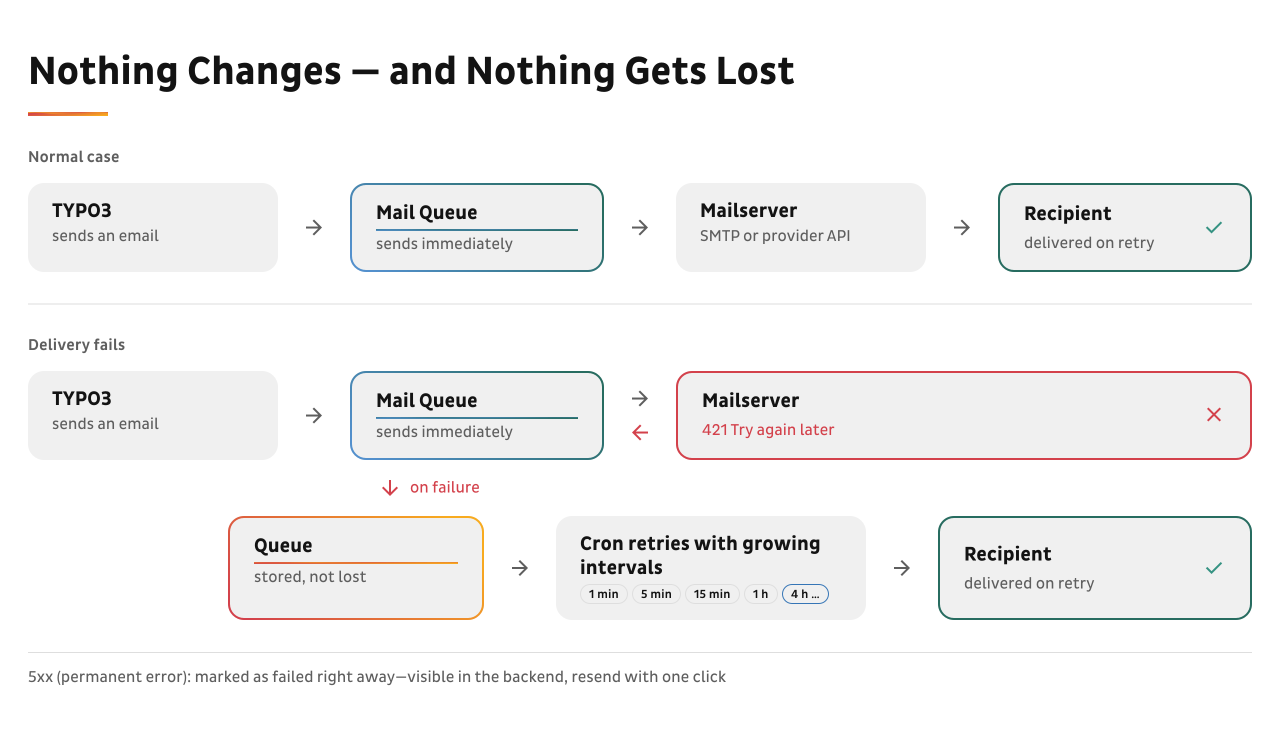
Emails go out immediately. Only the ones that fail get caught, queued, and retried until they are delivered.

Diagram: Mail Queue sends emails directly and only queues failed ones for automatic retry.

In the normal case, nothing sits between your request and SMTP. There’s no added latency (delay) and no waiting for a scheduler (TYPO3’s tool for running tasks at set times). Only a failed delivery is caught. The email then lands in a database queue and is retried on a backoff schedule, where each wait is longer than the last:

  1. After 1 minute
  2. After 5 minutes
  3. After 15 minutes
  4. After 60 minutes
  5. Then every 4 hours, up to 20 attempts in total

If the email still hasn’t gone out after about 61 hours (roughly two and a half days), Mail Queue gives up, and the email shows up as red in the dashboard and the backend module.

Temporary errors get retried, while permanent ones (a genuinely unknown recipient, for example) are not hammered for days. Mail Queue records them right away and keeps the message, so you can inspect it and resend it by hand. Attachments survive too: they’re stored once and reused on each retry, so the database doesn’t bloat.

Which Emails Does Mail Queue Cover?

All of them. Mail Queue hooks into TYPO3’s mail transport (the part of TYPO3 that hands emails to the mail server) rather than into application code—core-near, the way we build. That means it covers every email on the instance: your own extensions, the form framework (TYPO3’s built-in form tool), and felogin (TYPO3’s frontend login) password resets.

You don’t need to change any calling code. The one thing to check is whether an extension actually uses the TYPO3 mailer, which almost every maintained extension does.

If you run several sites from one TYPO3 instance, each can send through its own mail server. Mail Queue remembers which account an email belongs to and always retries through that same account, so a queued email never goes out under the wrong sender. On a single-site install, there’s nothing extra to set up because Mail Queue uses your normal transport.

How Do I Set Up Mail Queue?

Setup takes three steps:

  1. Install the Composer package (Composer is the standard tool for installing PHP software).
  2. Add one line of configuration.
  3. Set up two recurring jobs (timed tasks), either in the TYPO3 scheduler or as a cron job on the server.

Until that configuration line is in place, nothing is intercepted or queued. That means you can install Mail Queue now and switch it on when you’re ready. It runs on TYPO3 v13.4.23 or later, and v14.

Mail queue status indicating 2 emails queued, oldest 7 minutes, with retries in progress and an alert threshold of 30 minutes.
Mail Queue Status widget in the TYPO3 dashboard showing an orange warning.

See What Your Email Is Doing

Reliability is only half of it. You also need to see what your email is doing.

If you use the TYPO3 dashboard (the start screen with widgets in the TYPO3 backend), the “Mail Queue Status” widget gives you a traffic light:

  • Green: everything went out directly.
  • Orange: emails are queued and retrying.
  • Red: something has been stuck too long or was given up on.

One glance is enough, so there’s no need to dig through logs.

At TAE, that’s exactly the job Mail Queue does:

Mail Queue also works as an early warning system.
Niklas Pahl, TAE Get Mail Queue

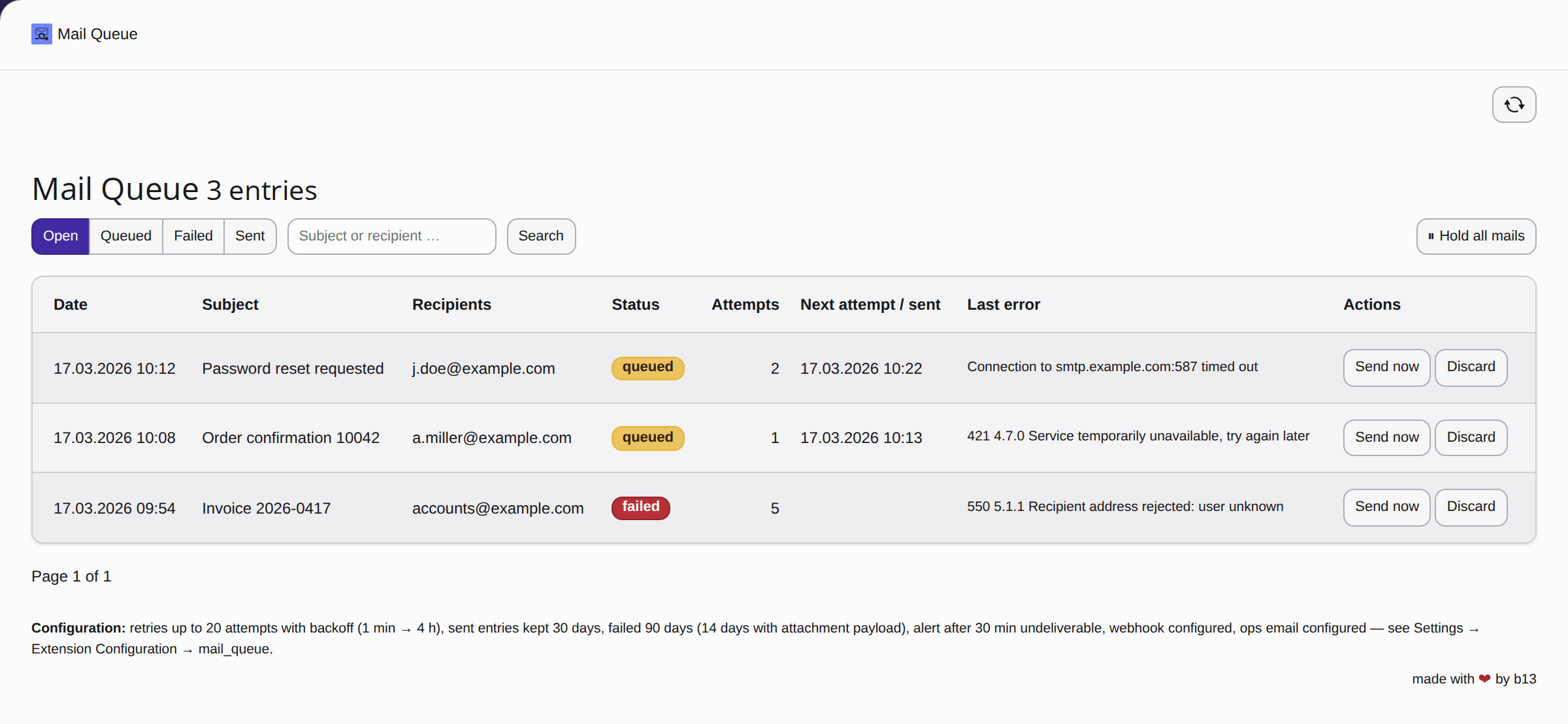
The backend module (a section of the TYPO3 admin area) under Site Management goes deeper. It lists every entry with a status filter and search. Click a subject and you get the full email: headers (sender, recipient, subject, and technical details), text body, the HTML body (the formatted version of the email) rendered safely in a sandboxed frame (an isolated window, so nothing in the email can affect TYPO3), and the attachment list. That replaces the BCC-yourself hack with real proof of what was sent, for every email, without touching sending code.

Mail Queue backend module in TYPO3 listing outgoing emails with status filter and search.
Our website is very complex. Different systems, agencies, and service providers work together, and having it all visible in a kind of dashboard is incredibly practical.
Niklas Pahl, TAE Read Mail Queue Success Story

The module ships in English and German, and every label can be overridden per installation. That way, the people who actually work the queue read it in their own language, without anyone forking (making their own modified copy of) the code.

Can Editors Use Mail Queue Without Admin Rights?

Yes, and for agencies that’s the useful bit. The module stays hidden until you grant it, and the rights are granular. A trusted editor who runs a site can:

  • watch the queue,
  • resend a stuck email, and
  • redirect an email to a corrected address after a typo in the recipient.

At TAE, the last point matters most. Participants book without a customer account, so nobody tells them when they mistype their address:

In three out of four cases, it’s a typo in the email address.
Robin Renz, Head of Marketing and Communications, TAE Get Mail Queue

Instead of looking up the customer and writing a new email with the confirmation link by hand, the team now corrects the address and resends the email in the module.

I can correct the email address and resend the email straight from Mail Queue. It’s a much simpler workflow.
Niklas Pahl, TAE Read Mail Queue Success Story

Two further rights are separate: deleting individual entries, and holding or resuming delivery for the whole instance. That way, you can let an editor tidy up their own emails without handing them the switch that stops delivery instance-wide—the one control you want on a short leash.

On a multi-site instance (one TYPO3 installation running several websites), you can limit an editor to their own site or sites by picking the allowed sites on their backend group. They then see only that site’s emails in the list, in the detail view, and when resending, and the server enforces this. Holding and resuming delivery stays instance-wide and needs the separate manage right.

This also keeps privacy manageable. The module shows real email content, including password resets and other personal data, so either limit a delegated editor to their site or grant the full view only to people you trust across the whole instance.

How Do I Get Alerts When Emails Fail?

For production monitoring, we strongly recommend a webhook (an automatic message one system sends to another over the web). When the queue is red, SMTP is usually the broken part, which means an email alert may never get through.

A webhook over HTTPS (a secure web connection) is the alert that still reaches you. It posts to Slack or Teams once when things turn red and once when they recover, not once a minute.

Mail queue notifications showing an alert for one undelivered mail for 31 minutes, followed by a recovery message indicating all mails delivered.
Slack message from a Mail Queue webhook warning that emails are stuck in the queue.

Hold Emails Locally and on Staging Instead of Running a Mail Catcher

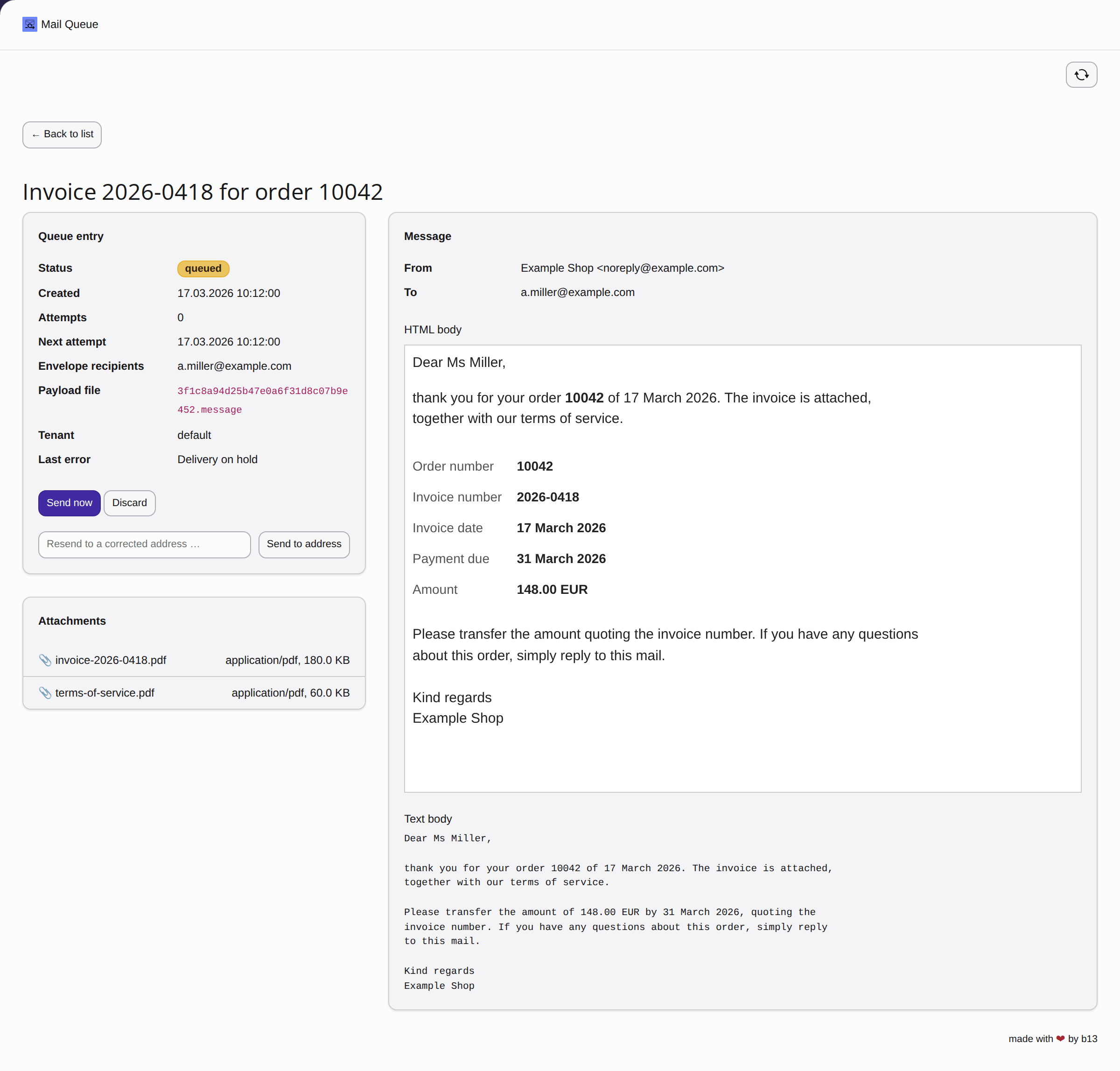
For day-to-day work, hold mode is often the feature that sticks. Flip on “hold all mails,” and every outgoing email is caught in the queue instead of being sent. You can open any of them in the backend and read the whole thing—headers, text, rendered HTML, and attachments—right inside TYPO3.

If you’ve run Mailpit (or MailHog before it), two popular mail catcher tools, on your machine or on staging, you know the value: catch the emails, look at them, and don’t actually deliver them. Mail Queue does the same job without the extra container (a separately run software package, for example in Docker) to run, host, and explain. The emails show up in the TYPO3 backend that you and your client already know.

Detail view of a held email in the TYPO3 backend with headers, text body, rendered HTML, and attachments.

Locally, you see exactly what your code produced. On staging, customers can test their own emails by triggering the form or the order and then reading the caught email. If you want to verify real delivery for one specific message, you send just that one. You also don’t need a separate license, because one production-instance license already covers staging, review (a preview environment for checking changes), and local.

Why forceHold Is Safer on Staging

For local, staging, and test environments, there’s a stronger guarantee. A manual hold lives in the database, which is fine on production. The catch is that staging regularly imports the production database, and that import carries production’s “keep sending” state along. A manual staging hold gets wiped by the next dump (database copy), and email starts flowing again.

The forceHold setting lives in the deployment config instead (the configuration files that ship with each environment), so a database import can’t clear it. When it’s on, the environment simply never sends, and no admin can lift that by accident.

One practical note: held emails pile up. On staging, set a retention period (how long emails are kept) so the daily cleanup keeps the table and disk in check. A single purge command wipes the queue clean before a demo or after a load test (a test that simulates lots of traffic).

The same hold is useful on production too. For example, you can pause a batch during a planned mail-server migration, then resume, and everything goes out on the next run.

Archive Mode: Proof of What Was Sent

Archive mode closes the last gap. It keeps every sent email and its content until the retention period you set removes it, with the module limited to whoever should see it.

That gives you a real answer to the BCC hack: proof that the license email, the invoice, or the password reset went out, and exactly what it said. It works for every email, with no code changes, and you can resend any of them from the module with one click.

Why It Matters

In our projects, email is one of those things that only gets attention when it fails. Mail Queue makes delivery something you can trust and, when needed, prove. You get fewer “where’s my email?” tickets, a clear trail when someone asks, and the option to drop a separate mail catcher on staging. Editors can handle day-to-day queue work (limited to their site on multi-site), admins keep the critical switches, and each site can still use its own mail server.

Before Mail Queue, a problem like that wasn’t visible at all. Now we have the full picture whenever a technical problem comes up again.
Robin Renz, Head of Marketing and Communications, TAE Read success story

Free extensions can log an email and give you a resend button. The real difference is everything that happens after a failure: retrying until the email lands, an alert that reaches you even when the mail server is down, and the per-tenant (per client or site) account that stays correct on every retry.

Mail Queue is built for production, with a production checklist, deployment-safe environment settings, and an end-to-end test suite (automated tests that check the whole sending process from start to finish). We also run it where it would hurt us first: Mail Queue delivers the license emails for the b13 Marketplace, which carry a customer’s Composer credentials (the login details for downloading paid packages). If one of those went missing, somebody would have paid us and received nothing. Mail Queue also delivers the booking emails for the Technische Akademie Esslingen on tae.de.

FAQ

Why doesn’t my TYPO3 email arrive?

Often because the mail server or email provider had a temporary problem when TYPO3 tried to send. Standard TYPO3 doesn’t retry, so the email is lost without a trace.

Does Mail Queue slow down sending?

No. Emails go out immediately as usual. Mail Queue only steps in when a send fails.

How long does Mail Queue keep retrying?

Up to 20 attempts over about 61 hours: after 1, 5, 15, and 60 minutes, then every 4 hours.

Which TYPO3 versions does Mail Queue support?

TYPO3 v13.4.23 LTS or later, and v14.

Can Mail Queue replace Mailpit on staging?

Yes. Hold mode catches every outgoing email so you can read it in the TYPO3 backend, and forceHold makes sure staging never sends real emails.

How much does Mail Queue cost?

Mail Queue is a yearly license per production instance. It covers all environments of that instance, including staging, review, and local. The product page has the current prices.

What do you think?

Had that lost-email call in your own projects? Consider Mail Queue to save yourself sleepless nights.

Written by:

Bild von David Steeb

b13 Founder and CEO, David, is someone you’ll meet if you’re thinking about working with our agency. He is constantly learning new skills and is an influential part of our cutting-edge frontend practice.

David Steeb CEO
more from David Steeb