---
title: Single Sign-On for TYPO3—Log In With Your Own IdP
url: "https://b13.com/products/single-sign-on-for-typo3"
description: "One login through your identity provider. Permissions stay where they belong: in TYPO3."
image: "https://b13.com/fileadmin/_processed_/e/a/csm_sharing-ext-SingleSignOn-M_3693015bc6.png"
date: 2026-03-09
modified: 2026-11-10
---
# Single Sign-On for TYPO3—Log In With Your Own IdP

Single Sign-On for TYPO3—Your Identity Provider, Your Rules
=============================================================
**Your organization already decided who may log in where. TYPO3 is the system that never got the message.**
Single Sign-On makes TYPO3 a SAML 2.0 service provider. Editors and frontend users authenticate against Microsoft Entra ID, Keycloak, ADFS, or whatever else your organization runs—and TYPO3 accepts the assertion instead of a password. Joiners, leavers, and password policy are handled where they already are handled.
Get Single Sign-On [ Read the documentation ](https://b13.com/products/single-sign-on-for-typo3/documentation)
The Problem
-------------
Every TYPO3 installation keeps its own list of who exists and its own idea of what a good password is. That is one more list than your organization wants.
**Somebody leaves and the account stays.** Their directory entry is disabled the same afternoon; the `be_users` row is not, because nobody outside the project knows it exists. It is still there at the next audit, and it is the finding that is hardest to explain.
**Your password policy stops at the CMS.** Rotation, length, a second factor—all of it is enforced in your identity provider and none of it reaches TYPO3, which has its own rules and its own reset mail.
**Every editor carries one more credential.** Not the worst thing on its own, but it is the one they forget, and the reset lands on whoever maintains the site.
**And the agency has a copy of it.** Whoever built the site has a login that outlives the project unless somebody remembers to remove it.
None of this is a TYPO3 defect. It is what happens when an application keeps its own users while the organization keeps everyone else’s somewhere else.
How It Works
--------------
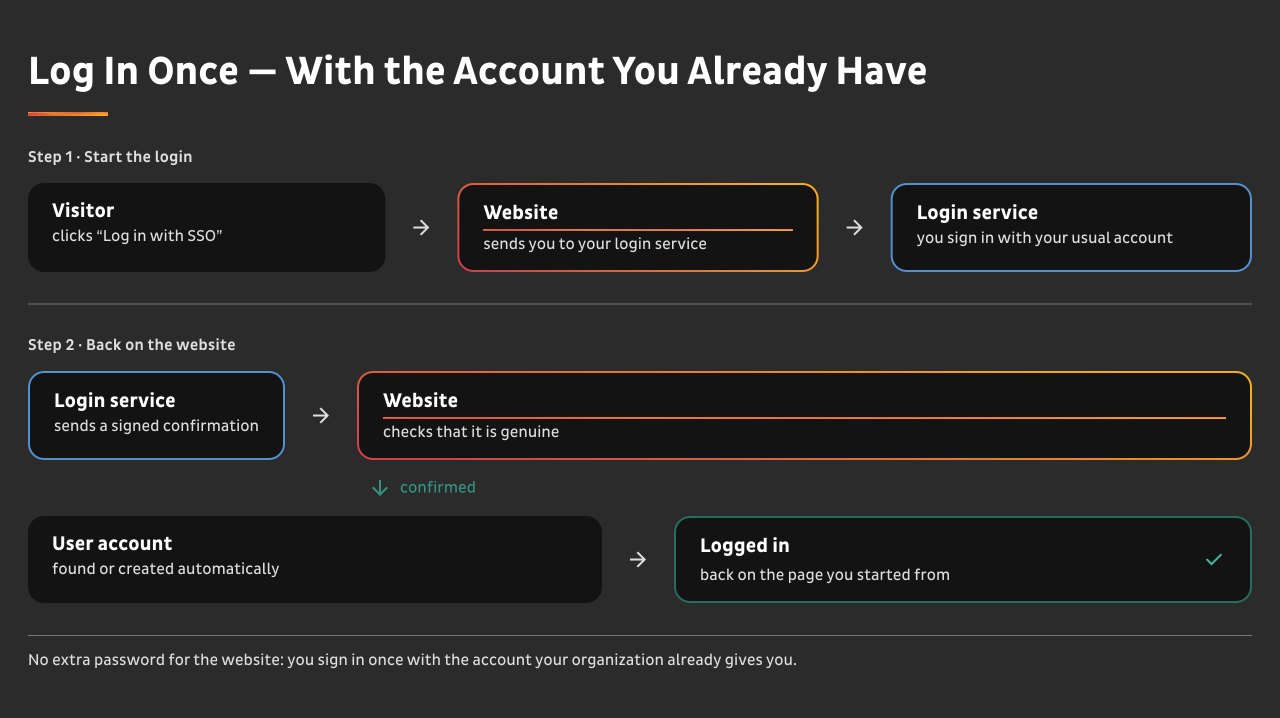
**TYPO3 becomes a service provider.** You register it once at your identity provider, point the extension at the provider’s metadata, and the login screen gains an entry next to the usual one.
**Backend and frontend are separate service providers.** Each has its own entity ID, its own configuration, and its own certificate—and either can be used without the other. Editors can sign in through your corporate directory while the frontend keeps its own login, or the other way round, or both against different providers. Frontend configuration is per site.
**Logout travels too.** A single logout request ends the session on both sides, not just the local one.
**Nothing changes until you point it somewhere.** Installing the extension alone leaves every login screen exactly as it was. Switching over is a deliberate act, per scope.
 [ ](https://b13.com/fileadmin/Products/Single-Sign-On/SSO-EN___l___1280.svg)
What You Get
--------------
### The Account Question, Answered Before Anyone Asks
Federation—creating the TYPO3 user from the assertion—is **off by default in both scopes**, and off is the safe setting: an identity your provider authenticates but TYPO3 has no user for is **rejected, and the rejection is recorded**. Nobody gets an account by walking past.
Turn federation on for a tenant whose users should all have access. Leave it off where your provider serves the whole company and only some of them belong in the CMS—or restrict it with a listener on `BeforeUserCreationEvent` and decide in your own code who gets in.
### A Way Back In, Always
The Install Tool stays reachable with its own credentials, independent of SSO. If the provider is unreachable, the metadata expires, or a certificate is replaced at the wrong moment, you are not locked out of your own CMS. **This is the first question every operations team asks, and the answer is not “call us”.**
### Groups From Claims, Not From a Spreadsheet
Group membership can follow the claims your provider sends, so the question “who may edit which section” is answered in the directory your organization already maintains. Change a group there, and the next login carries it.
### Rejected Logins Are Visible
Every refused login lands in `sys_log`, with the technical detail in the PSR-3 logger. When somebody says “I can’t get in”, you find out why in the system you already monitor, instead of reproducing it.
### It Runs Where You Run
Behind TLS termination, behind a reverse proxy, with the configuration that makes assertion validation work rather than fail in a way that looks like a credentials problem. Certificates and provider URLs live in environment variables, so the same codebase serves development, staging, and production against different providers.

### Your Own Code Gets a Say
Two PSR-14 events sit at the two moments that matter: before a user is created, and before their data is updated from the assertion. Map an unusual claim, block a group, keep a field your project owns from being overwritten—without a fork.
Compared to What You Have Today
---------------------------------
| | TYPO3 as it ships | Single Sign-On |
|---|---|---|
| Who owns the account list | Who owns the account list TYPO3 as it ships TYPO3, separately per installation | Who owns the account list Single Sign-On your identity provider |
| A leaver loses CMS access | A leaver loses CMS access TYPO3 as it ships when somebody remembers | A leaver loses CMS access Single Sign-On when their directory entry is disabled |
| Password policy and second factor | Password policy and second factor TYPO3 as it ships TYPO3’s own, separate | Password policy and second factor Single Sign-On whatever your provider enforces |
| Backend and frontend | Backend and frontend TYPO3 as it ships one user concept | Backend and frontend Single Sign-On two service providers, independently usable |
| Creating users on first login | Creating users on first login TYPO3 as it ships — | Creating users on first login Single Sign-On optional, off by default, and refusable per identity |
| Refused logins | Refused logins TYPO3 as it ships — | Refused logins Single Sign-On recorded in sys\_log |
| Way back in without the provider | Way back in without the provider TYPO3 as it ships — | Way back in without the provider Single Sign-On Install Tool, with its own credentials |
**What this does not replace.** Your provider still decides who exists and what they must present—a second factor, a hardware token, a conditional access rule. Single Sign-On is what makes TYPO3 honor that decision instead of keeping its own.
Who This Is For
-----------------

**Organizations with a directory and an audit.** Universities, public administration, hospitals, groups with a shared IT department. If somebody has to answer once a year who had access to what, an application with its own user list is the answer that takes longest to produce.

**Editorial teams inside a larger company.** The people who maintain the site are employees first and editors second. Their account should end the way every other account ends.

**Agencies running client installations.** You are carrying logins to systems that stopped being your responsibility years ago—and every one of them is your liability until somebody removes it. With SSO there is nothing to carry: access follows your client’s directory, so it ends when your engagement does. The license belongs with the installation and moves with it at handover.

**Anyone who has already standardized on Entra ID or Keycloak.** The work of choosing a provider is done. This is the part that connects it to the CMS.
System Requirements
---------------------
- TYPO3 **v13.4 LTS or v14.3**
- PHP **8.3** or later, with the `simplexml` extension—identity provider metadata is read as XML
- An identity provider that speaks **SAML 2.0**, and its metadata as a URL or an XML file
- A certificate pair for signing, and the ability to set environment variables
SAML itself is handled by `onelogin/php-saml`, pulled in as a dependency. Example configurations for local development with Keycloak and DDEV ship with the extension.
Installation
--------------
After purchase you get access to the b13 Marketplace with your own Composer repository.
```
```
1
2
```
```
```
```
composer config repositories.b13 composer https:
composer require b13/sso-authentication
```
```
Your credentials go into `auth.json`. A ZIP download is available in your account for installations without Composer access.
Then: generate the certificates, set the environment variables, register TYPO3 at your identity provider, and switch on the scope you want. The [documentation](https://b13.com/products/single-sign-on-for-typo3/documentation) walks through it and ends with a production checklist and a smoke test—go through both before you call it done.
[ Read the full documentation ](https://b13.com/products/single-sign-on-for-typo3/documentation)
Pricing
---------
**One price, per year and per production instance**—one TYPO3 installation, one codebase, one database. How many sites, editors, or identity providers run inside it does not change the price. Staging, test, and local installations of the same project are covered by it.
### Single Sign-On
One production instance
€990
net , | yearly
Get Single Sign-On
**Standardizing your whole TYPO3 estate?** That is the usual reason to buy this—one directory deciding access everywhere, not on one site out of eight. Tell us how many production instances you run and we will price it as one arrangement rather than eight separate ones.
**No setup fee.** Onboarding is available and optional; if you want us to walk through the first configuration with you, say so and we will price it separately.
**Why a yearly license.** This sits in your login path and depends on how TYPO3 resolves users, sessions, and sites—the area that moves most between major versions, and the one where a security release cannot wait. That is what the year buys.
Support
---------
**Every license includes** email support, bug fixes, updates for new TYPO3 versions, and security fixes. One inbox, one queue. Requests that stop your operation get pulled forward. You get a ticket reference and can ask for the status at any time.
**Priority—€300 per year per license.** A guaranteed reply within one business day and prioritized bug fixes.
**Enterprise—from €990 per year.** Response times agreed by severity, a defined availability window, an escalation path, and an annual review. Individually contracted.
**What support does not cover:** installing and configuring it in your project, adapting it to your specific case, debugging your own code or environment, data cleanup, and training. We diagnose for up to an hour per request; if the cause turns out to be outside Single Sign-On, we tell you what we found and where to look.
**Single Sign-On runs in your instance**, so there is no uptime to commit to—what we commit to is when we answer.
Security reports go to [**security@b13.com**](mailto:security@b13.com). We read every report and reply with an assessment, and we agree a disclosure date with you before anything is published. If your own disclosure process needs a fixed date, say so in the report and we will agree one.
FAQ
-----
### What happens if our identity provider is unreachable?
The Install Tool stays reachable with its own credentials, so an administrator can get in and turn SSO off for the scope that is stuck. Frontend and backend are configured separately, so an outage on one side does not take the other with it.
### Does this give us multi-factor authentication?
Your identity provider’s, yes—whatever it enforces applies to TYPO3 logins from the moment you switch over, because the authentication happens there. Single Sign-On does not add a second factor of its own, and it would be the wrong place for one.
### Our provider speaks OpenID Connect, not SAML. Does that work?
Not today—this is a SAML 2.0 service provider. Entra ID, Keycloak, and ADFS all speak SAML alongside OIDC, so in practice it is usually a matter of registering a second application rather than changing providers. Tell us what you run and we will check it with you.
### Do all our directory users end up with a TYPO3 account?
Only if you ask for it. Creating users on first login is off by default, and an identity without a matching TYPO3 user is refused and logged. Where your provider serves the whole organization, a listener on `BeforeUserCreationEvent` decides in your own code who gets an account.
### Can editors still log in with a password?
That is your choice per scope. The SSO entry sits next to the usual login, and the password login stays primary unless you enforce SSO—which you can, for the backend and per site in the frontend.
### What about our existing users?
They are matched, not replaced. An account that already exists is found again on the first SSO login rather than duplicated, and the columns the extension keeps sit alongside the ones TYPO3 already had.
### Can we use different providers for backend and frontend?
Yes. They are separate service providers with separate configuration—different providers, one of the two only, or the same one twice.
### What happens when the license expires?
Your running installation is unaffected—the code on your server keeps working, and nothing switches itself off. What ends is access to the releases: our Composer repository stops serving you new downloads.
**One thing to know about your pipeline.** If your deployment runs `composer install` against our repository on every build, that build will fail once the license has lapsed. Your production site keeps running, but your next deploy doesn’t. The code is GPL-2.0-or-later, so the copies you already hold remain yours to keep.
And this is why there’s a grace period: if a payment fails, you keep pulling for another 13 days while it gets sorted out. We also remind you twice before the license runs out.
### Is it open source?
The code is GPL-2.0-or-later, like every TYPO3 extension. What you pay for is access to the releases, updates for new TYPO3 versions, security fixes, and support. You can read every line.
### Do we need a license for staging and test systems?
Your production license covers them. Staging, test, integration, and every local installation of the same project are included—only production instances are counted.
### What counts as one instance?
One TYPO3 installation—one codebase, one database. Everything inside it is covered: any number of sites, editors, and identity providers. Ten customer sites in one multi-site installation are one instance. Ten separate installations are ten—talk to us.
One Account List, Not Two
Your organization already knows who may log in. Single Sign-On is what tells TYPO3.
Get Single Sign-On [ Talk to Us First ](https://b13.com/lets-connect)