---
title: Manage displayed columns in List and File List View in TYPO3 v11
url: "https://b13.com/knowledge/show-columns-selector-in-list-view-and-file-list-view"
description: We show you how to use the new Show Columns Selector in TYPO3 v11 so you can manage large sites with hundreds of pages, records and assets with ease.
image: "https://b13.com/fileadmin/_processed_/9/6/csm_show-columns_191-1_e97ca52340.png"
date: 2022-03-15
modified: 2026-08-19
lastUpdated: 2026-08-19
---
# Manage displayed columns in List and File List View in TYPO3 v11
[ TYPO3 ](https://b13.com/knowledge/typo3) [ TYPO3 v11 ](https://b13.com/knowledge/typo3-v11)
Show Columns Selector in List View and File List View
=======================================================
Oliver Bartsch
15 March 2022
[ RSS Feed ](https://b13.com/rss.xml)

TYPO3’s most commonly used modules are boosted with a completely new component, enabling you to easily manage the displayed columns for records and files.
This post is part of our TYPO3 Version 11 Series. We’re shining a spotlight on some of the really useful features in version 11 and why you should upgrade.
- [Link Sharing in TYPO3 v11](https://b13.com/knowledge/link-sharing-in-typo3-v11)
- [Direct Downloads of Assets and Media](https://b13.com/knowledge/direct-downloads-assets-and-media)
- [New CLI commands and better automation for Continuous Integration](https://b13.com/knowledge/new-cli-commands-better-automation-for-continuous-integration)
- [Resizable Navigation Area in TYPO3](https://b13.com/knowledge/resizable-navigation-area-in-typo3)
- [Multi-factor authentication ](https://b13.com/knowledge/multi-factor-authentication-in-typo3-11)
- [Search & Filter for Folders and Assets](https://b13.com/knowledge/search-filter-for-folders-and-assets)
- [Limit allowed attempts for logins in TYPO3 v11 ](https://b13.com/knowledge/limit-allowed-attempts-for-logins-in-typo3-v11)
- **[Show Columns Selector in List View and File List View](https://b13.com/knowledge/show-columns-selector-in-list-view-and-file-list-view)**
- [Multi Record Selection](https://b13.com/knowledge/multi-record-selection)
- [Keyboard Navigation for Module Menu & Context Menu](https://b13.com/knowledge/keyboard-navigation-for-module-menu-context-menu)
- [Workspaces Improvements](https://b13.com/blog/workspaces-improvements)
- [Consistent UX makes selecting items more intuitive](https://b13.com/knowledge/consistent-ux-makes-selecting-items-more-intuitive)
- [New TCA types in TYPO3 version 11](https://b13.com/knowledge/new-tca-types-in-typo3-version-11)
The problem: A lot of columns
-------------------------------
As an editor, managing content, records and assets is a daily task in TYPO3. Therefore, editors usually spend most of their time in the “List” and “File List” modules. Both modules display a large number of columns in their listings. A standard content element has more than 60 columns by default. It can be a headache locating the relevant columns, especially if they are not properly labeled.
A short history of the Field Selector
---------------------------------------
To keep track of the relevant columns, in previous versions TYPO3 provided the “field selector”. Unfortunately, this tool had a couple of drawbacks. Firstly, it was not easy to find! It was somewhat hidden at the bottom of the page, and not directly related to any record type. In addition, the tool was only available in the “single-table view”— so editors couldn’t use it in the “List View”. To top it off, the “File List View” did not know about this tool and didn’t allow the editor to enable the display of metadata columns at all.
Introducing the Columns Selector
----------------------------------
A completely new component—the Columns Selector—has been added inTYPO3 v11 to support editors and improve the user experience in general. It is available for each record type individually and can be found in the title row, no matter if you’re in “List View” or “single-table view”.
But hold on, the Columns Selector is also available in the “File List View”, making managing assets a pleasure. You’ll find it on the right, between the search bar and the listing. Look for the button labeled “Show columns”.
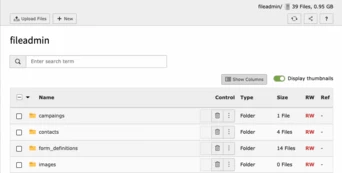 Show columns Button in File List View
1. Click the **Columns Selector** button. A modal window opens, displaying all available columns, sorted alphabetically, for the related record type (or the file metadata columns in the “File List View”).
2. Click the label or the eye icon to check (or uncheck) the columns.
3. Press the **Update** button. The list will display only the selected columns. Note that some columns are default and will always display, for example the title.
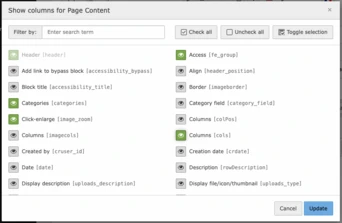 Show columns modal window
Speaking labels
-----------------
It’s not just editors who get all the fun. TYPO3 administrators working with “management fields” like “pid” and “crdate”, will be happy about the fact that all those columns received speaking labels in version 11. Additionally, virtual columns such as “reference count”, “path” or “read/write permissions” are now equipped with a speaking label, making them a lot easier to locate.
Check them all
----------------
You are right, we are still confronted with more than 60 columns for a content element. So instead of scrolling through such a huge list, you should definitely try the “filter”, “check all”, “uncheck all” and “invert selection” actions, located in the modal header.
### Our secret tip:
While the filter is active, all other actions are bound to the current filter result. This means, when using the “check all” action, while the list is filtered, the action is only applied to the currently visible items.
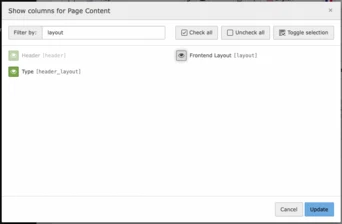 Show columns filtered
Administration
----------------
While we are sure you will love the Column Selector, it’s possible to disable the component with the following User TSconfig options:
```
1
2
3
4
5
6
7
8
9
10
11
12
13
```
```
mod.web_list.displayColumnSelector = 0
file_list.displayColumnSelector = 0
mod.web_list.table.tt_content.displayColumnSelector = 0
file_list.displayColumnSelector = 0
mod.web_list.displayColumnSelector = 0
mod.web_list.table.sys_category.displayColumnSelector = 1
```
Conclusion
------------
While the “List View” might be overwhelming for new users, the new Columns Selector will support them in shrinking the listing to their needs. Experienced users will also benefit from this feature to further improve their workflows, especially when working with large TYPO3 installations or sites with huge volumes of records and files.
Have you already tried the Columns Selector?
----------------------------------------------
We’d love to hear how it’s helping you!.
[ Let’s connect ](https://b13.com/lets-connect)
### Written by:

Oli is a TYPO3 Core developer who loves to collaborate with teammates on new TYPO3 features and bug fixes. His essential tool: PHPStorm.
Oliver Bartsch Development
[ more from Oliver Bartsch ](https://b13.com/team/oliver-bartsch)
Related Articles
------------------
- 
### T3ppy Gives TYPO3 a Friendly Face
06 August 2026 | Florian “Flix” Keitgen
TYPO3 is powerful—but it doesn’t have to feel impersonal. Meet T3ppy, our friendly companion for the backend.
[ Read more: T3ppy Gives TYPO3 a Friendly Face ](https://b13.com/knowledge/t3ppy-design-kit)
- 
### AI Content in TYPO3: Labelling Needs Accountability
02 August 2026 | Benni Mack
The EU AI Act brings the origins of AI-generated content into focus. AI Label marks AI-generated and AI-edited content in TYPO3 and records who signed off the published version—for…
[ Read more: AI Content in TYPO3: Labelling Needs Accountability ](https://b13.com/knowledge/ai-content-in-typo3-labelling-needs-accountability)
- 
### Better scalability with decoupled queues: How to set up RabbitMQ with TYPO3
10 April 2024 | Jochen Roth
When built-in message transports hit their limits, RabbitMQ can provide TYPO3 with a scalable, robust message queue.
[ Read more: Better scalability with decoupled queues: How to set up RabbitMQ with TYPO3 ](https://b13.com/knowledge/better-scalability-with-decoupled-queues-how-to-set-up-rabbitmq-with-typo3)
- 
### Meet T3ppy: A New Era for Editorial Work in TYPO3
01 April 2026 | Florian “Flix” Keitgen
T3ppy and the AiM extension bring AI directly into the TYPO3 backend—enhancing SEO, content quality, and workflows with centralized control.
[ Read more: Meet T3ppy: A New Era for Editorial Work in TYPO3 ](https://b13.com/knowledge/meet-t3ppy-a-new-era-for-editorial-work-in-typo3)
- 
### Why TYPO3 Needs a Marketplace for Products
25 March 2026 | Florian “Flix” Keitgen
A marketplace would make TYPO3 products more discoverable, easier to compare, and benefit both agencies and clients alike.
[ Read more: Why TYPO3 Needs a Marketplace for Products ](https://b13.com/knowledge/why-typo3-needs-a-marketplace-for-products)
- 
### Unlocking TYPO3’s Hidden Gem: The Backend User Section (Doktype 6)
05 March 2026 | David Steeb
Discover TYPO3’s underrated doktype 6 (Backend User Section) for secure internal previews, editor training, and prototyping. Learn real use cases, common pitfalls like 403 errors…
[ Read more: Unlocking TYPO3’s Hidden Gem: The Backend User Section (Doktype 6) ](https://b13.com/knowledge/backend-user-section-in-typo3-uses-pitfalls-helper)
- 
### Backend Previews With a System—Why We Built EXT:backendpreviews
09 February 2026 | David Steeb
EXT:backendpreviews brings structure and consistency to content previews in the TYPO3 backend using Fluid templates, layouts, and partials.
[ Read more: Backend Previews With a System—Why We Built EXT:backendpreviews ](https://b13.com/knowledge/backend-previews-with-a-system-why-we-built-extbackendpreviews)
- 
### The Internet Is No Longer Just for Humans—AI Bots Love Markdown
28 January 2026 | Benni Mack
Discover why most web traffic is now automated and how TYPO3’s structured content model prepares websites for humans, editors, and AI systems.
[ Read more: The Internet Is No Longer Just for Humans—AI Bots Love Markdown ](https://b13.com/knowledge/the-internet-is-no-longer-just-for-humans-ai-bots-love-markdown)
- 
### Camino—The Need for a Default Theme in TYPO3 Is Real
27 January 2026 | Benni Mack
With TYPO3 v14, Camino introduces a default theme that removes friction from first installs. Why this matters—and how TYPO3 laid the groundwork.
[ Read more: Camino—The Need for a Default Theme in TYPO3 Is Real ](https://b13.com/core-insights/blog/camino-the-need-for-a-default-theme-in-typo3-is-real)
- 
### T3CON25—One Step Closer to the Future of Content Management
10 December 2025 | Franzi Töpler
T3CON25 showcased the future of TYPO3 with insights on TYPO3 v14, AI, digital sovereignty, and open-source solutions driving secure, modern web experiences.
[ Read more: T3CON25—One Step Closer to the Future of Content Management ](https://b13.com/knowledge/shaping-the-future-of-content-management-t3con25)