---
title: Optimize your daily workflow with the TYPO3 dashboard
url: "https://b13.com/knowledge/optimize-your-daily-workflow-with-the-typo3-dashboard"
description: The TYPO3 dashboard is geared towards maximum extensibility. Discover the benefits, take a tour under the hood and find out how to build your own custom widgets.
image: "https://b13.com/fileadmin/_processed_/e/f/csm_Dashboard_191-1_9c4b686706.png"
date: 2021-03-26
modified: 2026-08-19
lastUpdated: 2026-08-19
---
# Optimize your daily workflow with the TYPO3 dashboard
[ TYPO3v10 ](https://b13.com/knowledge/typo3v10) [ Core-Development ](https://b13.com/knowledge/core-development)
Optimize your daily workflow with the TYPO3 dashboard
=======================================================
Get to know the new TYPO3 dashboard component, added in v10
Oliver Bartsch
30 March 2021
[ RSS Feed ](https://b13.com/rss.xml)
Today we want to take a look at one of the most underrated features in TYPO3: the dashboard. By default, it’s the entry point of every TYPO3 installation and displays important information bundled in one view. Dashboard widgets are not information-only but can be interactive. For example, they can contain links letting you navigate directly to a specific backend module.
Interactive widgets on the dashboard are an incredible time saver. For example, an administrator could go directly to a failed scheduler task with one click from the dashboard. An editor can jump directly to an editing task without having to navigate to the content element.
Widgets can also display information from external sources, which makes the whole component even more useful.
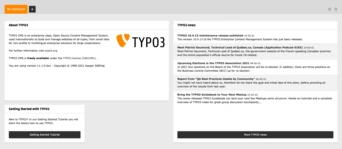 A screenshot showing an example default dashboard
A short history
-----------------
A nine year old Forge issue gives an indication of how long the dashboard idea has been circulating in TYPO3. It is one of those components that required a lot of specification, preparation and lines of code—so time passed by. Luckily some community members picked up this topic in early 2019 and created the TYPO3 Dashboard initiative. The initiative, under the direction of Richard Haeser began to create a proof-of-concept extension. Their main focus was to make the dashboard customizable and extensible. While working on TYPO3 10.3 the initiative decided to integrate the dashboard as a system extension into the Core.
It was at this point that I first realized the potential of the new component and fell in love with it right away. I was very pleased to help with the integration into the Core and the fine-tuning for the LTS release.
 The Dashboard icon image
The benefits
--------------
The benefit of this component is actually not new. Most smartphones use widgets to provide information in a compact way on the home screen, so that you don’t have to open the corresponding apps. The same applies to the TYPO3 dashboard and its widgets. The user does not need to access multiple modules anymore to get an overview of the current system status. Widgets are a lot easier to maintain and to register than backend modules.
It’s possible for each user to individualise their own dashboard, and to have multiple dashboards—which are displayed in tabs. For example, an editor might have one dashboard providing information about the current state of content and translation, another showing information about the current SEO performance of the site, and perhaps a third highlighting any broken links and redirects required.
 A screenshot showing the tabs for three different dashboards that an editor role might use
Widgets
---------
TYPO3 comes with a couple of generic widgets but the main benefit and power is in creating custom widgets tailored to the respective installation.
You may already have started to think about possible widgets for your use-cases. This is great and I did this, too. So let’s present some widgets which I think would be useful.
For administrators:
- Top 10 most frequent error messages
- Recently failed scheduler tasks
- Currently installed 3rd party extensions
For editors:
- Recently created content elements and pages
- Records awaiting approval in workspaces
- Pages that need to be optimized for search engines
- Broken links
For developers:
- Last deployment information
- Extensions with deprecated code
- Available security updates for TYPO3 and 3rd party extensions
These ideas are presented as ideas only—it really depends on your TYPO3 installation and the needs of your users. That’s why TYPO3 comes with only a handful of generic widgets that could suit every installation.
I have personally already created a lot of widgets for my clients, each individually tailored to their needs. For example, after a website relaunch, I created a widget which revealed the top ten most called URLs that led to a 404 error. Since this widget also featured a direct link to the Redirects module, the client was able to react on such occurrences rapidly by creating corresponding redirects.
For developers, there are also a lot of interesting widget possibilities. Another widget I created uses the official rss feed to display the latest security advisories for TYPO3. It quickly became clear that this widget should not be missing from any installation, so it was added as a core widget and is now available in TYPO3 by default.
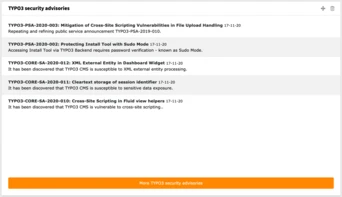 Screenshot showing TYPO3 security advisories widget
Implementation
----------------
The dashboard is geared towards maximum extensibility. Almost every part can be customized:
- The widgets themselves (for example, their width and height)
- Widget groups—combinations of thematically similar widgets
- Dashboard presets—combinations of widgets to be automatically added to a dashboard
- Dashboard templates and stylesheets
### Under the hood
Widgets are a PHP class configured as a service using the Symfony [service container](https://symfony.com/doc/current/service_container.html) concept. Therefore all widgets must be configured in either the `Services.yaml` or the `Services.php` file of an extension.
Widgets must also contain the dashboard.widget tag, so they will be automatically registered by a compiler pass. Each widget can be configured with multiple (tag) arguments. They are automatically added (injected) to the corresponding PHP class. Since there are already a couple of widget PHP classes included in the Core, you can reuse these classes and just provide different arguments for your custom widgets in the configuration.
For example, it’s easily possible to use the RSS widget for displaying a custom rss feed. The configuration for an RSS widget, displaying latest b13 blog articles, could look like this:
```
1
2
3
4
5
6
7
8
9
10
11
12
13
14
15
16
```
```
dashboard.widget.b13blog:
class: 'TYPO3\CMS\Dashboard\Widgets\RssWidget'
arguments:
$view: '@dashboard.views.widget'
$cache: '@cache.dashboard.rss'
$options:
feedUrl: 'https://b13.com/blog/rss.xml'
tags:
- name: dashboard.widget
identifier: b13blog
groupNames: b13WidgetGroup
title: 'LLL:EXT:b13_widgets/Resources/Private/Language/locallang.xlf:widgets.b13blog.title'
description: 'LLL:EXT:b13_widgets/Resources/Private/Language/locallang.xlf:widgets.b13blog.description'
iconIdentifier: 'content-widget-rss'
height: 'large'
width: 'medium'
```
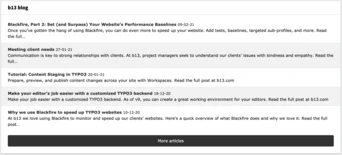 Screenshot showing b13 blog widget
As you can see in this example, the widget will be added to the b13WidgetGroup group. Since this group does not exist yet, we have to create it. Therefore, the file `Configuration/Backend/DashboardWidgetGroups.php` must exist in the extension, returning a PHP array:
```
1
2
3
4
5
6
```
```
return [
'b13WidgetGroup' => [
'title' => 'LLL:EXT:b13_widgetst/Resources/Private/Language/locallang.xlf:b13widgetGroup.title'
]
];
```
If we also want to add a dedicated dashboard preset, containing our new widget, we have to add the following PHP array to the `Configuration/Backend/DashboardPresets.php` file:
```
1
2
3
4
5
6
7
8
9
10
11
12
```
```
return [
'b13Preset' => [
'title' => 'LLL:EXT:b13_widgets/Resources/Private/Language/locallang.xlf:b13Preset.title',
'description' => 'LLL:EXT:b13_widgets/Resources/Private/Language/locallang.xlf:b13Preset.description',
'iconIdentifier' => 'tx-b13-widgets',
'showInWizard' => true,
'defaultWidgets' => [
'b13blog'
]
]
];
```
This will add the preset to the Add Dashboard wizard, including our b13blog widget.
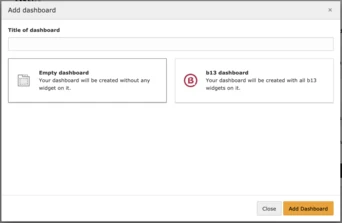 Screenshot showing b13 dashboard preset in the Add dashboard window.
Using User TSconfig it’s possible to configure this new preset to be used whenever a user accesses the dashboard module for the first time. Therefore, the following User TSconfig must be added:
`options.dashboard.dashboardPresetsForNewUsers = b13Preset`
To customise the display, we can add a custom template using TypoScript:
`module.tx_dashboard.view.templateRootPaths.110 = EXT:b13_widgets/Resources/Private/Templates`
### To see this in action, you can have a look at our demo extension:
[https://github.com/b13/b13\_widgets](https://github.com/b13/b13_widgets)
### Permissions
The user groups record, accessible in the backend Users module, features the **Dashboard widgets** field in the Access List tab. An administrator can therefore configure which user group has access to which widgets.
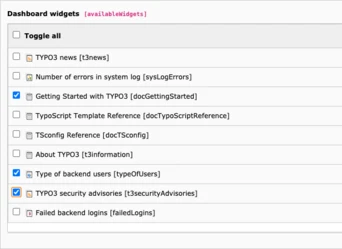 Screenshot showing Dashboard widget permissions
How to use it
---------------
### Create a dashboard
1. Navigate to **Dashboard** on the module menu on the left of the screen.
2. Click the **+** icon (Add Dashboard) in the tab bar. The **Add dashboard** window displays.
3. In the **Title of dashboard** field, type a name for your new dashboard.
4. Select **Empty dashboard**.
Depending on the individual configuration of your TYPO3 installation, you may see other dashboards available to select. These will have widgets pre-configured.
5. Click the **Add Dashboard** button. The new dashboard is displayed.
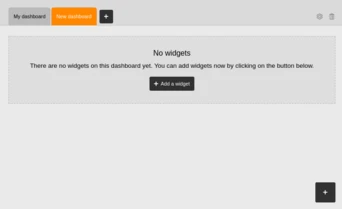 Screenshot showing a new blank dashboard
Use the controls at the top right corner of the dashboard to rename or delete the dashboard.
### Add widgets
To add widgets to a dashboard, there is always a “+” button (Add widget) in the bottom right corner.
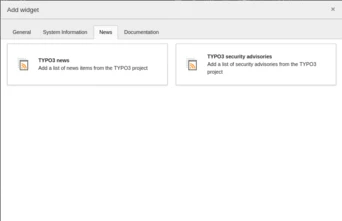 The Add widget window, with the News tab active
1. Click the **Add a widget** button.The **Add widget** window displays.
2. Click a widget to add it to your dashboard.
3. Use the controls at the top right corner of the widget to move or delete it.
 Screenshot showing a widget being moved
For more detailed guidance, please visit the official documentation:
.
Go exploring
--------------
There are already lots of extensions containing widgets, and even extensions that just consist of widgets. Do some exploring in the [TER](https://extensions.typo3.org/?L=0&id=1&tx_solr%5Bq%5D=widget) to see what you can find.
I myself created an extension [custom\_dashboard\_widgets](https://github.com/o-ba/custom_dashboard_widgets), which provides all kinds of customisation examples and a set of individual widgets that you can use.
Share your ideas
------------------
There are currently no further major tasks planned by the Core team. However, if you are already using the dashboard, I would be very happy to receive further feedback from you. Maybe there is still room to improve, be it the UX, the API or a completely different part of the component.
I’d also love to hear recommendations of great widgets you have come across—built by the community or built yourself.
We are putting some serious effort into continuously improving TYPO3, and we love that you can, too. #opensourcelove
----------------------------------------------------------------------------------------------------------------------
[ Read more about that here ](https://b13.com/knowledge/investing-in-typo3-core-development)
### Written by:

Oli is a TYPO3 Core developer who loves to collaborate with teammates on new TYPO3 features and bug fixes. His essential tool: PHPStorm.
Oliver Bartsch Development
[ more from Oliver Bartsch ](https://b13.com/team/oliver-bartsch)
Related Articles
------------------
- 
### Happy Release Day TYPO3 v14: Why This Release Shows the True Strength of Open Source
21 April 2026 | Florian “Flix” Keitgen
TYPO3 v14 improves workflows for editors, marketing teams, and developers—and shows how community-driven open source creates real impact.
[ Read more: Happy Release Day TYPO3 v14: Why This Release Shows the True Strength of Open Source ](https://b13.com/knowledge/happy-release-day-typo3-v14-why-this-release-shows-the-true-strength-of-open-source)
- 
### QR Codes in TYPO3 v14: Built-in Link Management That Just Works for Editors
17 April 2026 | David Steeb
TYPO3 v14 adds QR code generation to Link Management. Create codes before URLs are final, track scans via redirect stats, update targets anytime, and avoid third-party tools. Ideal…
[ Read more: QR Codes in TYPO3 v14: Built-in Link Management That Just Works for Editors ](https://b13.com/qr-codes-in-typo3-v14-built-in-link-management-that-just-works-for-editors)
- 
### Why TYPO3 Needs a Marketplace for Products
25 March 2026 | Florian “Flix” Keitgen
A marketplace would make TYPO3 products more discoverable, easier to compare, and benefit both agencies and clients alike.
[ Read more: Why TYPO3 Needs a Marketplace for Products ](https://b13.com/knowledge/why-typo3-needs-a-marketplace-for-products)
- 
### Visual Editing in TYPO3: When Content Management Happens in Context
16 March 2026 | Florian “Flix” Keitgen
Discover the Visual Editor by anders und sehr that enables true in-context content editing. Learn how Camino, the new frontend theme, and improved editorial workflows transform…
[ Read more: Visual Editing in TYPO3: When Content Management Happens in Context ](https://b13.com/knowledge/visual-editing-in-typo3-when-content-management-happens-in-context)
- 
### Why we built QR codes into TYPO3: Bringing print campaigns under CMS control
12 February 2026 | Jochen Roth
QR codes generated outside your CMS break when pages move. TYPO3 v14.1 brings QR code management into the backend. Create, track, and retarget from one place.
[ Read more: Why we built QR codes into TYPO3: Bringing print campaigns under CMS control ](https://b13.com/knowledge/qr-codes-in-typo3-bringing-print-campaigns-under-cms-control)
- 
### Camino—The Need for a Default Theme in TYPO3 Is Real
27 January 2026 | Benni Mack
With TYPO3 v14, Camino introduces a default theme that removes friction from first installs. Why this matters—and how TYPO3 laid the groundwork.
[ Read more: Camino—The Need for a Default Theme in TYPO3 Is Real ](https://b13.com/core-insights/blog/camino-the-need-for-a-default-theme-in-typo3-is-real)
- 
### What’s New in TYPO3 v13?
20 January 2026 | Desirée Lochner
TYPO3 v13 marks the beginning of a new era of user-friendliness. The version impresses with a modern, fresh, and incredibly high-performance user interface—developed for anyone who…
[ Read more: What’s New in TYPO3 v13? ](https://b13.com/solutions/typo3/whats-new-in-typo3-v13)
- 
### Designing TYPO3 14’s Backend: Our Vision for a Modern, Expandable Foundation
12 January 2026 | Laura Heine
b13 is redesigning TYPO3’s backend for version 14 to feel modern, work faster, maintain user context, and create an expandable foundation that can evolve for years to come.
[ Read more: Designing TYPO3 14’s Backend: Our Vision for a Modern, Expandable Foundation ](https://b13.com/knowledge/designing-typo3-14s-backend-our-vision-for-a-modern-expandable-foundation)
- 
### Unlocking a world of country information
21 March 2025 | Benni Mack
TYPO3 simplifies working with country lists by including a comprehensive Country API out-of-the-box, sourced from authoritative UN data. Say goodbye to third-party extensions and…
[ Read more: Unlocking a world of country information ](https://b13.com/knowledge/unlocking-a-world-of-country-information)
- 
### Future-proof your website to stay competitive for the long haul
07 March 2023 | Desirée Lochner
In an ever-evolving technological landscape, keeping your brand and technology up-to-date and competitive can feel like a full-time job. Whether you’re working on a website…
[ Read more: Future-proof your website to stay competitive for the long haul ](https://b13.com/knowledge/future-proof-your-website-to-stay-competitive-for-the-long-haul)