---
title: Add non-configurable content elements with one click in TYPO3 v10
url: "https://b13.com/knowledge/one-click-adding-of-content-elements-in-typo3"
description: "TYPO3 v10 saves editors time and clicks: no need to save then close for content elements with no configuration settings. Another reason to upgrade!"
image: "https://b13.com/fileadmin/_processed_/f/1/csm_Create_Content_Elements_191-2_05b837536c.png"
date: 2020-06-02
modified: 2026-08-19
lastUpdated: 2026-08-19
---
# Add non-configurable content elements with one click in TYPO3 v10
[ CType ](https://b13.com/knowledge/ctype) [ TYPO3v10 ](https://b13.com/knowledge/typo3v10)
Add non-configurable content elements with one click in TYPO3 v10
===================================================================
13 things we love about TYPO3 v10
David Steeb
03 June 2020
[ RSS Feed ](https://b13.com/rss.xml)

In TYPO3 v10, we took an unnecessary step out of the process for adding non-configurable content elements. This streamlining will save countless clicks, time, and distractions for editors all over the world.
The story behind the change
-----------------------------
TYPO3’s structured content model frees editors to enter their content once, in semantic content elements, allowing efficient reuse across any and all channels and devices.
A while ago, we were writing an extension to give a client’s editors standardized layout elements in the editor interface within the backend Page Module. For many of these layout elements, no configuration was necessary, so we thought it would be helpful to save the editors a few clicks by bypassing the configuration form altogether. It occurred to us that the TYPO3 core should incorporate this, too. There was no point in forcing editors to see a configuration form for things like dividers and standardized headings and click “save” then “close” to continue their work.
So Benni went ahead and added it to TYPO3 v10. We love this feature! It will save thousands of editors across the world so much time and reward them for structuring their content correctly.
Making it easy for editors to structure their content
-------------------------------------------------------
Structured content has always been a core benefit of using TYPO3: it makes editors‘ work go further by enabling them to input it once and have it displayed beautifully (and correctly) on many devices. It does require discipline from editors, though, so the more polished the experience, the better you can get them on board with this approach. It rewards them for entering content in a way the system can work with best.
TYPO3 v10’s new “save and close” tweak is excellent for simple elements such as dividers and pre-configured layouts with areas for content. But there are more complex scenarios, too: say you have a content type for staff members with standardized headings, but you want the editor to be able to change the order—for example, to put “Personal Achievements” above “Career to Date.” Rearrangement isn’t possible with a rigidly pre-defined element. You could, however, offer the headings as available content elements and let the editor place them appropriately. Making these reusable content elements would ensure the wording is consistent across the site, including translations. If you change either of these, they will be updated everywhere by changing just one setting.
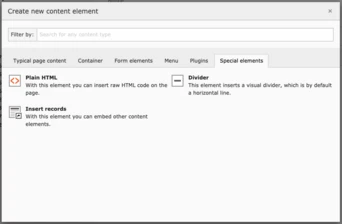 Part of TYPO3's standard content element types, the “Divider” element is configured to use this new one-click-creation by default.
This small improvement to the editor interface will save many hours of editors‘ time when you think of all the people across the world who work with TYPO3 every day.
How devs can use it
---------------------
So now I’ve sold you on this feature, how does a dev implement it? It’s almost as easy as flipping a switch. Just set `saveAndClose` to `true`:
```
1
2
3
4
5
6
7
8
9
```
```
div {
iconIdentifier = content-special-div
title = Divider
description = This element inserts a visual divider.
tt_content_defValues {
CType = div
}
saveAndClose = true
}
```
Like the look of TYPO3 v10? It’s time to upgrade!
---------------------------------------------------
If you’re already sold on TYPO3 v10 then welcome to the club! Our website is already running on version 10, and we’d love to talk to you about upgrading. Stay tuned for our regular posts in our “13 things” series—we’ll be presenting many new changes and reasons why you shouldn’t hang around before updating.
[ Let’s Connect ](https://b13.com/lets-connect)
### Written by:

b13 Founder and CEO, David, is someone you’ll meet if you’re thinking about working with our agency. He is constantly learning new skills and is an influential part of our cutting-edge frontend practice.
David Steeb CEO
[ more from David Steeb ](https://b13.com/team/david-steeb)
Related Articles
------------------
- 
### Backend Previews With a System—Why We Built EXT:backendpreviews
09 February 2026 | David Steeb
EXT:backendpreviews brings structure and consistency to content previews in the TYPO3 backend using Fluid templates, layouts, and partials.
[ Read more: Backend Previews With a System—Why We Built EXT:backendpreviews ](https://b13.com/knowledge/backend-previews-with-a-system-why-we-built-extbackendpreviews)
- 
### Optimize your daily workflow with the TYPO3 dashboard
30 March 2021 | Oliver Bartsch
The TYPO3 dashboard is geared towards maximum extensibility. Discover the benefits, take a tour under the hood and find out how to build your own custom widgets.
[ Read more: Optimize your daily workflow with the TYPO3 dashboard ](https://b13.com/knowledge/optimize-your-daily-workflow-with-the-typo3-dashboard)
- 
### Auto-updated redirects: A feature to convince you to upgrade TYPO3
08 December 2020
TYPO3 made some important updates to site handling in v9 and v10. We wrote an explainer on new changes, including slug naming and automatic redirects.
[ Read more: Auto-updated redirects: A feature to convince you to upgrade TYPO3 ](https://b13.com/knowledge/auto-slug-update-typo3-v10)
- 
### Deprecations and breaking changes to celebrate in TYPO3 v10
18 August 2020 | Michael Semle
These changes keep TYPO3 awesome. They’re worth the effort it takes to adapt!
[ Read more: Deprecations and breaking changes to celebrate in TYPO3 v10 ](https://b13.com/knowledge/deprecations-and-breaking-changes-to-celebrate-in-typo3-v10)
- 
### Another thing we love about TYPO3 v10: the PSR-14 event dispatcher
11 August 2020 | Daniel Goerz
It’s easier to extend third-party TYPO3 code, both for new and seasoned developers. Another reason to upgrade.
[ Read more: Another thing we love about TYPO3 v10: the PSR-14 event dispatcher ](https://b13.com/knowledge/psr-14-event-dispatcher-in-typo3-v10)
- 
### Lazy loading just got lazier in TYPO3 v10
28 July 2020 | Daniel Sattler
Learn how TYPO3 v10 supports reduced page load times and saves bandwidth with browser-native image lazy loading. No JS required!
[ Read more: Lazy loading just got lazier in TYPO3 v10 ](https://b13.com/knowledge/lazy-loading-just-got-lazier-in-typo3-v10)
- 
### Flexible Containers and Grids for TYPO3, Part Three
22 July 2020 | David Steeb
How to add complex page layout substructures using the TYPO3 Container Extension. Part 3 of our series.
[ Read more: Flexible Containers and Grids for TYPO3, Part Three ](https://b13.com/knowledge/flexible-containers-and-grids-for-typo3-part-three)
- 
### Flexible Containers and Grids for TYPO3, Part Two
20 July 2020 | David Steeb
How to extend TYPO3’s built-in layouts with a simple 2-column element using the Container Extension. Part 2 of our series.
[ Read more: Flexible Containers and Grids for TYPO3, Part Two ](https://b13.com/knowledge/flexible-containers-and-grids-for-typo3-part-two)
- 
### Flexible Containers and Grids for TYPO3
16 July 2020 | David Steeb
Extend TYPO3’s built-in layout concepts with the Container Extension. Simple flexibility for editors, reduced risk for future upgrades.
[ Read more: Flexible Containers and Grids for TYPO3 ](https://b13.com/knowledge/flexible-containers-and-grids-for-typo3)
- 
### More Secure, Convenient, and Efficient Password Reset
01 July 2020 | Daniel Gorges
Editors can reset their password securely without having to contact an admin. Another reason to upgrade to the latest version.
[ Read more: More Secure, Convenient, and Efficient Password Reset ](https://b13.com/knowledge/more-secure-convenient-and-efficient-password-reset)