---
title: "Navigating Page Movements and Redirects in TYPO3: A Comprehensive Guide"
url: "https://b13.com/knowledge/navigating-page-movements-and-redirects-in-typo3-a-comprehensive-guide"
description: Explore our comprehensive guide on managing redirects and page movements in TYPO3. Learn how to maintain SEO and enhance user experience with seamless navigation adjustment.
image: "https://b13.com/fileadmin/_processed_/5/f/csm_MovingPagesRedirects_Sharing_97e44037b2.png"
date: 2024-11-05
modified: 2026-08-19
lastUpdated: 2026-08-19
---
# Navigating Page Movements and Redirects in TYPO3: A Comprehensive Guide
[ SEO ](https://b13.com/knowledge/seo) [ TYPO3 ](https://b13.com/knowledge/typo3)
Navigating Page Movements and Redirects in TYPO3: A Comprehensive Guide
=========================================================================
David Steeb
10 March 2025
[ RSS Feed ](https://b13.com/rss.xml)
Moving pages and changing site structure is a website inevitability. When your business grows, your products and services change, and this has a flow-on effect for your website. Deleting old content, renaming pages, introducing sub-domains—all of these actions require changes to your web pages, bringing with it the potential headache of redirects.
Redirects create a smooth, uninterrupted visitor experience by seamlessly diverting a visitor from one URL to another—but can quickly become unwieldy to manage. All too often, it requires a tool external to your content management system (CMS) to map old links to new ones. A content editor or webmaster with a spreadsheet usually has to track redirects manually. But page management shouldn’t and needn’t create headaches: ideally, your CMS will take care of the logistics so you can focus your attention on content strategy.
TYPO3 CMS has an elegant solution to many page management challenges. It automatically creates redirects for you—or lets you set them manually—so you can be intentional about visitor paths through your website. The Redirects module means you don’t have to leave the CMS to manage your redirects, and when used in concert with Link Validator, you get hands-on control of your page management. In this guide we’ll cover the facets of page management and how to navigate some of the challenges using TYPO3—including working with “slugs,” links, and redirects.
Struggling to get a handle on redirects and page management?
[ Let’s Connect! ](https://b13.com/lets-connect)
What is a slug?
-----------------
A slug is the reader-friendly part of the URL that displays after the domain name, and identifies the page for readers and search engines.
In the early days of the internet, it was common to see query strings in URLs like “www.example.com/index.php?id=13.” But that doesn’t give you much of a hint about the page’s content—it has no semantic value. A **semantic slug** means you can tell at a glance from the URL what content the page is going to deliver, for example, “about-us” or “contact”. In the URL of this blog post, everything after b13.com is the slug.
Most CMSs use the page title as the slug. This is generally the H1 of the page. But you might want to change the slug to help visitors or search engines better understand the content. Sometimes the page title differs from what you want search engines to use. Or perhaps you want to remove words from a blog post title to create a shorter slug. A good CMS will let you make the slug whatever you want.
Managing website changes: Why redirects matter
------------------------------------------------
Setting the slug is straightforward when you first create a page—but what happens when you need to change an established website with regular traffic and constant visitors? That’s when **redirects** come into play.
During the normal course of content management, you’ll actively change content on your site by renaming, merging and deleting pages. On a more structural level, you might move pages higher or lower in your page hierarchy, or implement localized region-specific product pages. And for major projects, you might move your website to an entirely new domain. All of these changes usually generate a new URL—which necessitates a redirect. A redirect is an instruction that maps an old URL to a new one, to seamlessly send visitors and search engines to a different URL than they expect/was requested.
### Enhance user experience (UX) with smooth redirects
When it comes to UX, redirects essentially make your changes invisible. When a URL is broken or the page cannot be found, without redirects in place, your site displays a 404 page. Old links to your content exist in the wild—in search engine results, other websites, and browser bookmarks. Landing on a 404 page can be a jarring experience that interrupts a visitor’s flow. They may quickly lose interest and leave your site. Redirects, however, send users to the current URL even when they click on an old one, allowing them to view the content intended. Crafting a smooth user experience is hard work, and redirects help you maintain that flow. Great UX means visitors stay on your site longer. What’s more, search engines detect engaged or repeat visitors as legitimate traffic and place your site higher in search engine rankings.
### Preserve Search Engine Optimization (SEO) with intentional redirects
When you make changes to pages, you don’t want to lose the topic authority that your website has already established. Changing a URL can adversely impact your SEO by making search engine crawlers re-index your website and force them to make sense of missing pages and broken links.
> TYPO3 allows for seamless content updates and slug modifications without losing page authority. You can update the page title without affecting the slug, allowing detailed control over SEO aspects of your content strategy.
### Leverage your CMS to manage redirects
It usually falls to content editors or webmasters to manage a long list of pages with old URLs mapped to new URLs. Not only is this inefficient and time-consuming, it is not necessary. Your CMS should fully support you, and TYPO3 can! Proper page management with redirects saves the labor power of editors and webmasters. You don’t want to have to use yet another tool to map and track your redirects. Ideally, your CMS will anticipate and automate redirects after content changes to ease the load on your webmaster, and free content editors to concentrate on content, not logistics.
It may seem a small thing, but the way TYPO3 handles redirects makes the actions of editors much more fail-safe. They don’t have to worry about accidentally forgetting to set a necessary redirect.
TYPO3’s Approach to Identifying Pages: PageIDs
------------------------------------------------
In TYPO3, everything is built on pages. Each page gets an ID, counting from one upwards. But this ID is not displayed in the URL. TYPO3 uses human-readable, “speaking” URLs by default.
To create the URL, TYPO3 uses a prefix, like your domain or a language prefix, followed by a slug, representing the full path for each page. For example, www.example.com/de/about-us.
The PageID concept in TYPO3 has multiple benefits:
- **Persistent URLs:** Even with slug changes and page movements, URLs remain consistent, allowing the structure of navigation to be independent of URL names.
- **Link integrity:** Internal links automatically update to always point to the current URL.
- **Robust link handling**: If you delete or hide a page referenced on your website, the link is removed but the text remains.
- **SEO stability:** SEO rankings are maintained when pages are moved within the site.
- **Domain flexibility**: There’s no need to swap preview domains with production; TYPO3 manages content based on IDs, not domains.
PageIDs removes the tedious elements of content and page management, freeing editors up to focus on content strategy.
Guide to redirect and link management in TYPO3
------------------------------------------------
### Configuring automatic slug updates
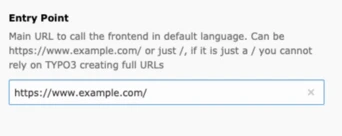
TYPO3 automatically sets a redirect every time you change a slug. First, set an EntryPoint in the Site Configuration module, which functions as the basis for every slug on every page in your website.
### Note for developers:
When you are still in your early days of developing your site and don’t need any redirects, you can disable them in the config.yaml until your site is live.
```
1
2
3
4
5
6
7
8
9
10
11
12
13
14
15
```
```
settings:
redirects:
autoUpdateSlugs: true
autoCreateRedirects: false
redirectTTL: 30
httpStatusCode: 307
```
When editors change a page title or move pages within the page tree, TYPO3 does not automatically recalculate the slug of the page based on its new position and page title. For example, if you have a page titled “Products” with the slug “/products” and decide to reorganize your website to move “products” under “services”, the URL remains unchanged.
When you rename a page title (that is, change the H1 of the page), TYPO3 won’t immediately modify the slug to match. You need to press the **Refresh** icon to recalculate the URL segment from the page title.
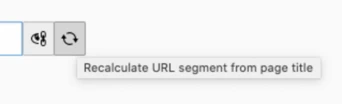
When you change a slug and save the page, a redirect from the old URL to the new URL is created. All sub-pages are checked too, and the slugs are updated and redirects are created for these as well. A popup-message will inform you of what happened.
The system automatically alerts if a chosen slug is already in use, ensuring each URL is unique within the TYPO3 installation. You can [configure automatic redirect settings](https://docs.typo3.org/c/typo3/cms-redirects/main/en-us/Setup/Index.html#site-configuration) in the config.yaml file for each site.

You have three options:
- **Close the message**—your new slug with a properly set redirect is in place.
- **Revert the update**— all the automatically created redirects and slug changes of sub-pages will be reverted.
- **Revert redirects only**—revert the automatically created redirects but keep the automatically-set slug changes on the sub-pages.
> The ID linking system in TYPO3 ensures that any changes to a page’s slug are reflected across all internal links, eliminating dead links within the TYPO3 environment and maintaining crucial link equity for SEO.
### Managing redirects
In the Site Management > [Redirects](https://docs.typo3.org/c/typo3/cms-redirects/main/en-us/Introduction/Index.html) module, editors can [set, configure, and manage](https://docs.typo3.org/c/typo3/cms-redirects/main/en-us/Usage/Index.html#redirects-module) redirects so you can ensure link continuity and address any discrepancies in URL mapping.
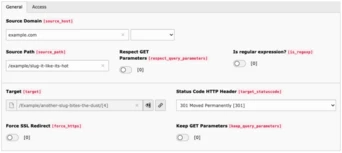
Obviously, you don’t want any dead ends but beware—too many redirects can eat up your crawl budget. The crawl budget is the number of pages search engines can crawl on a website within a certain timeframe. Hundreds of redirects make for inefficient crawling and adversely impact your site’s SEO performance. You’ll need to devote active and regular maintenance to your page management strategy to keep it clear and efficient.
### Always current internal links
The integrity of TYPO3 linking is very powerful. For [internal links](https://docs.typo3.org/m/typo3/tutorial-editors/main/en-us/ContentElements/RichTextEditor/Index.html#internal-links) on your site, when you link to a page from another page, the database links to the PageID, not the URL. This keeps things seamless for your website visitors, so when they follow internal links on your site they are always sent to the current URL.
If you delete or hide the page, it removes the link from the text on the frontend. Visitors will see the text and their reading experience will remain unhindered. Similarly, if you have a link on an image, and the link target is deleted, the image remains but the link is removed.
### Alerts to track external links
External links carry the risk of changing without notice. You don’t want to lose credibility with your website visitors, so regularly checking external links is important. TYPO3 makes this a light-lift with the powerful [Link Validator tool](https://docs.typo3.org/c/typo3/cms-linkvalidator/main/en-us/Introduction/Index.html). It checks the links in your website for validity and reports broken links or missing files in your TYPO3 installation. You can set up a ‘just-in-time’ check on publish, or schedule a crawl every week to send you a report by email.
Best Practices for Page Moves and Redirects
---------------------------------------------
Page management begins before you even build your website, and it doesn’t matter what CMS you use. Once you have a plan in place, it’s not a set-and-forget process. You’ll need to keep track of the sitemap structure and keep pace with any changes, noting page names, slugs, and redirects as they occur.
- **Plan your site structure with SEO in mind** - When planning the architecture of your website, try to make the structure extensible. Page moves are inevitable but you want to minimize them as much as possible.
- **Keep track of redirects** – It’s good to keep a snapshot of current redirects. In TYPO3 you can do this in the [Redirects module](https://docs.typo3.org/c/typo3/cms-redirects/main/en-us/Usage/Index.html#redirects-module), but a spreadsheeting tool can help you do this manually. Using the page history in TYPO3 can help you track page renames and gives you the option to rollback changes.
- **Redirect to similar content** - To maintain great UX, map to URLs that will provide the least cognitive friction for your visitors. No one likes to land on a page showing content that doesn’t match their expectations.
- **Avoid redirect** [**chains and loops**](https://www.newmediacampaigns.com/blog/what-are-redirects-and-why-are-they-important#:~:text=Avoid%20Redirect%20Chains) - Practice good redirect hygiene and audit your redirect lists regularly. Keep URL mapping to as few steps as possible—one step is the most efficient. Avoid loops where the source and target links map to the same URL. There are online tools that perform redirect audits on your site to help you identify redirect chains and loops (for example, [Ahrefs](https://ahrefs.com/site-audit) and [Screaming Frog](https://www.screamingfrog.co.uk/seo-spider/)).
Maximizing TYPO3 for Effective Page Management
------------------------------------------------
TYPO3’s approach to maintaining link integrity significantly simplifies website page management by focusing on page IDs rather than URLs. The ID linking system ensures that any modifications to a page’s slug are automatically reflected across all internal links, preserving link equity and eliminating dead links within the TYPO3 environment. This approach decouples content management from URL structure, making the lives of content editors and webmasters less complicated.
Websites are rarely static. TYPO3 empowers you with the flexibility to be intentional about your redirects and exercise complete control over your content management and page management strategies. The built-in Redirects module streamlines the process, allowing you to manage your redirects seamlessly without leaving the TYPO3 CMS interface.
Don’t let the complexities of page redirects overwhelm you.
[ Upgrade your TYPO3 version and get on top of your redirects! ](https://b13.com/services/typo3-upgrade)
### Written by:

b13 Founder and CEO, David, is someone you’ll meet if you’re thinking about working with our agency. He is constantly learning new skills and is an influential part of our cutting-edge frontend practice.
David Steeb CEO
[ more from David Steeb ](https://b13.com/team/david-steeb)
Related Articles
------------------
- 
### T3ppy Gives TYPO3 a Friendly Face
06 August 2026 | Florian “Flix” Keitgen
TYPO3 is powerful—but it doesn’t have to feel impersonal. Meet T3ppy, our friendly companion for the backend.
[ Read more: T3ppy Gives TYPO3 a Friendly Face ](https://b13.com/knowledge/t3ppy-design-kit)
- 
### AI Content in TYPO3: Labelling Needs Accountability
02 August 2026 | Benni Mack
The EU AI Act brings the origins of AI-generated content into focus. AI Label marks AI-generated and AI-edited content in TYPO3 and records who signed off the published version—for…
[ Read more: AI Content in TYPO3: Labelling Needs Accountability ](https://b13.com/knowledge/ai-content-in-typo3-labelling-needs-accountability)
- 
### Better scalability with decoupled queues: How to set up RabbitMQ with TYPO3
10 April 2024 | Jochen Roth
When built-in message transports hit their limits, RabbitMQ can provide TYPO3 with a scalable, robust message queue.
[ Read more: Better scalability with decoupled queues: How to set up RabbitMQ with TYPO3 ](https://b13.com/knowledge/better-scalability-with-decoupled-queues-how-to-set-up-rabbitmq-with-typo3)
- 
### Meet T3ppy: A New Era for Editorial Work in TYPO3
01 April 2026 | Florian “Flix” Keitgen
T3ppy and the AiM extension bring AI directly into the TYPO3 backend—enhancing SEO, content quality, and workflows with centralized control.
[ Read more: Meet T3ppy: A New Era for Editorial Work in TYPO3 ](https://b13.com/knowledge/meet-t3ppy-a-new-era-for-editorial-work-in-typo3)
- 
### Why TYPO3 Needs a Marketplace for Products
25 March 2026 | Florian “Flix” Keitgen
A marketplace would make TYPO3 products more discoverable, easier to compare, and benefit both agencies and clients alike.
[ Read more: Why TYPO3 Needs a Marketplace for Products ](https://b13.com/knowledge/why-typo3-needs-a-marketplace-for-products)
- 
### Unlocking TYPO3’s Hidden Gem: The Backend User Section (Doktype 6)
05 March 2026 | David Steeb
Discover TYPO3’s underrated doktype 6 (Backend User Section) for secure internal previews, editor training, and prototyping. Learn real use cases, common pitfalls like 403 errors…
[ Read more: Unlocking TYPO3’s Hidden Gem: The Backend User Section (Doktype 6) ](https://b13.com/knowledge/backend-user-section-in-typo3-uses-pitfalls-helper)
- 
### Backend Previews With a System—Why We Built EXT:backendpreviews
09 February 2026 | David Steeb
EXT:backendpreviews brings structure and consistency to content previews in the TYPO3 backend using Fluid templates, layouts, and partials.
[ Read more: Backend Previews With a System—Why We Built EXT:backendpreviews ](https://b13.com/knowledge/backend-previews-with-a-system-why-we-built-extbackendpreviews)
- 
### The Internet Is No Longer Just for Humans—AI Bots Love Markdown
28 January 2026 | Benni Mack
Discover why most web traffic is now automated and how TYPO3’s structured content model prepares websites for humans, editors, and AI systems.
[ Read more: The Internet Is No Longer Just for Humans—AI Bots Love Markdown ](https://b13.com/knowledge/the-internet-is-no-longer-just-for-humans-ai-bots-love-markdown)
- 
### Camino—The Need for a Default Theme in TYPO3 Is Real
27 January 2026 | Benni Mack
With TYPO3 v14, Camino introduces a default theme that removes friction from first installs. Why this matters—and how TYPO3 laid the groundwork.
[ Read more: Camino—The Need for a Default Theme in TYPO3 Is Real ](https://b13.com/core-insights/blog/camino-the-need-for-a-default-theme-in-typo3-is-real)
- 
### T3CON25—One Step Closer to the Future of Content Management
10 December 2025 | Franzi Töpler
T3CON25 showcased the future of TYPO3 with insights on TYPO3 v14, AI, digital sovereignty, and open-source solutions driving secure, modern web experiences.
[ Read more: T3CON25—One Step Closer to the Future of Content Management ](https://b13.com/knowledge/shaping-the-future-of-content-management-t3con25)