---
title: Your life made easy with link sharing and URL routing in TYPO3 v11.
url: "https://b13.com/knowledge/link-sharing-in-typo3-v11"
description: One of the most prominent and time-saving features that landed in TYPO3 v11 is “Link Sharing”. We walk through some use cases to show you how life-changing it is.
image: "https://b13.com/fileadmin/_processed_/7/a/csm_link-sharing_191-1_b503f369e4.png"
date: 2021-12-16
modified: 2026-08-19
lastUpdated: 2026-08-19
---
# Your life made easy with link sharing and URL routing in TYPO3 v11.
[ TYPO3 v11 ](https://b13.com/knowledge/typo3-v11)
Link Sharing in TYPO3 v11
===========================
Long pages? Multiple browser tabs? Team work? This feature saves you time and clicks.
16 December 2021
[ RSS Feed ](https://b13.com/rss.xml)

One of the most prominent and time-saving features that landed in TYPO3 v11 is “Link Sharing”.
This post is part of our TYPO3 Version 11 Series. We’re shining a spotlight on some of the really useful features in version 11 and why you should upgrade.
- **[Link Sharing in TYPO3 v11](https://b13.com/knowledge/link-sharing-in-typo3-v11)**
- [Direct Downloads of Assets and Media](https://b13.com/knowledge/direct-downloads-assets-and-media)
- [New CLI commands and better automation for Continuous Integration](https://b13.com/knowledge/new-cli-commands-better-automation-for-continuous-integration)
- [Resizable Navigation Area in TYPO3](https://b13.com/knowledge/resizable-navigation-area-in-typo3)
- [Multi-factor authentication ](https://b13.com/knowledge/multi-factor-authentication-in-typo3-11)
- [Search & Filter for Folders and Assets](https://b13.com/knowledge/search-filter-for-folders-and-assets)
- [Limit allowed attempts for logins in TYPO3 v11 ](https://b13.com/knowledge/limit-allowed-attempts-for-logins-in-typo3-v11)
- [Show Columns Selector in List View and File List View](https://b13.com/knowledge/show-columns-selector-in-list-view-and-file-list-view)
- [Multi Record Selection](https://b13.com/knowledge/multi-record-selection)
- [Keyboard Navigation for Module Menu & Context Menu](https://b13.com/knowledge/keyboard-navigation-for-module-menu-context-menu)
- [Workspaces Improvements](https://b13.com/blog/workspaces-improvements)
- [Consistent UX makes selecting items more intuitive](https://b13.com/knowledge/consistent-ux-makes-selecting-items-more-intuitive)
- [New TCA types in TYPO3 version 11](https://b13.com/knowledge/new-tca-types-in-typo3-version-11)
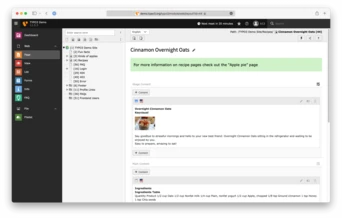
When you’re working in the TYPO3 administration interface—the TYPO3 Backend—the browser URL is usually your website domain appended with `/typo3/`, such as . TYPO3 v11 now detects the current module you’re browsing in the backend and updates the browser’s address bar (and the title of the browser tab) with the current module information. This feature opens up a world of possibilities for you as editor, site administrator or support person. Let’s take a look at a few examples.
### Collaborative Hand-off
Say you’re in charge of handling assets such as media files, screenshots for a blog post page, or product manuals you’re offering on your website. You have uploaded all the required assets to a specific subfolder in the Filelist module. Now you want to hand off the work to your colleagues. TYPO3 v11 means you can now copy the URL from your browser address bar to share. You might send it to your co-workers in your favorite messenger app, like [Microsoft Teams](https://www.microsoft.com/en-us/microsoft-teams/) or [Slack](https://slack.com/). You might paste it into your companies‘ ticketing system, like [JIRA](https://www.atlassian.com/jira) or [Asana](https://asana.com/). Your colleagues can pick off right where you left off, finding your uploaded assets and placing them on the web pages where they need to be.
 [ ](https://b13.com/fileadmin/Blog/typo3v11/Link_Sharing/Deep_Link.png)
### Native Browser Bookmarks
Do you find yourself having to regularly update a specific content block? Perhaps every day, or every week, such as the menu in a restaurant? In TYPO3 v11, when editing the content element, you can now bookmark the specific page in your browser. Next time you need to update the content block, click your bookmark and after you log in, TYPO3 takes you to that specific content for editing right away.
### Internal Customer Support
As a site administrator, you get a call that an editor has a problem with arranging content on a specific page. Instead of asking “What page are you working on?” you can say “Send me the URL”. The editor can send you the current URL from their browser and both of you can see the page in question right away. This will save time and potential confusion for both parties—we at b13 love this a lot already.
### Test this feature now!
You can try it out by logging into the demo.typo3.org installation which directly puts you on a specific content page
No more scrolling on long pages
---------------------------------
Say you work with long pages containing many content elements. When you finish editing and close the window for a particular content element, TYPO3 brings you back to that element in the backend page layout view. No more scrolling to find the element you just edited! This is a huge time saver and a big improvement to the overall editor experience.
### Working with Multiple Browser Tabs
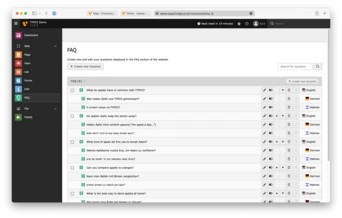
Are you a multitasker? You’re busy and you’re doing a million things at once. You’re not scared of having multiple browser tabs open. TYPO3 v11 is your friend! You can have multiple tabs of the same TYPO3 installation open, and the browser tab title will now tell you the module you have open. Now you can confidently jump back and forth between tabs, moving between modules with ease.
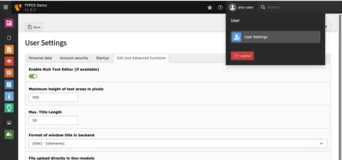
This is configurable in the User Settings module.
 [ ](https://b13.com/fileadmin/Blog/typo3v11/Link_Sharing/Multiple_Tabs.png)
 [ ](https://b13.com/fileadmin/Blog/typo3v11/Link_Sharing/User_Settings.png)
> Wow, that’s cool! What do I need to do to turn on this feature?
Activating native URL support and Link Sharing in your browser
----------------------------------------------------------------
If you’ve ever worked in the TYPO3 backend, you’ll know a moment where this feature would have saved you time.
The URL routing feature is available out-of-the-box with v11 LTS, and works with any module—yes, even custom-built modules from your agency.
When upgrading, note that you’ll need to make some minor adjustments to your “.htaccess” file. If you need any help, we’re here to offer professional support with your upgrades to TYPO3 v11, or any topics regarding your TYPO3 projects.
Ready to upgrade your TYPO3 site?
-----------------------------------
[ Let’s connect ](https://b13.com/lets-connect)
Related Articles
------------------
- 
### New TCA types in TYPO3 version 11
23 January 2023 | Oliver Bartsch
In previous installments of our TYPO3 v11 series, we covered some of the great UX improvements that are making editors‘ lives easier. In this final post of the series, we’ve got…
[ Read more: New TCA types in TYPO3 version 11 ](https://b13.com/knowledge/new-tca-types-in-typo3-version-11)
- 
### Consistent UX makes selecting items more intuitive
20 July 2022 | Benni Mack
Previously in this series, we covered the improvements TYPO3 v11 brought to the Page Tree in the post, Resizable Navigation Area in TYPO3.
There is one feature in particular that…
[ Read more: Consistent UX makes selecting items more intuitive ](https://b13.com/knowledge/consistent-ux-makes-selecting-items-more-intuitive)
- 
### Workspaces Improvements
01 July 2022 | Benni Mack
One of TYPO3’s powerful features for content publishing is Workspaces—creating and staging in a draft environment before publishing content. TYPO3 v11 adds a few important touches…
[ Read more: Workspaces Improvements ](https://b13.com/knowledge/workspaces-improvements)
- 
### Keyboard Navigation for Module Menu & Context Menu
28 June 2022 | Oliver Bartsch
TYPO3 version 11 supports keyboard navigation as suggested by the ARIA Authoring Practices. Users don’t need a mouse to navigate menus, trees, and to select multiple records. This…
[ Read more: Keyboard Navigation for Module Menu & Context Menu ](https://b13.com/knowledge/keyboard-navigation-for-module-menu-context-menu)
- 
### Multi Record Selection
25 May 2022 | Oliver Bartsch
Working with multiple records just got easier. Copy, edit and delete multiple files at once with this improved feature in v11.
[ Read more: Multi Record Selection ](https://b13.com/knowledge/multi-record-selection)
- 
### Show Columns Selector in List View and File List View
15 March 2022 | Oliver Bartsch
We show you how to use the new Show Columns Selector in TYPO3 v11 so you can manage large sites with hundreds of pages, records and assets with ease.
[ Read more: Show Columns Selector in List View and File List View ](https://b13.com/knowledge/show-columns-selector-in-list-view-and-file-list-view)
- 
### Limit allowed attempts for logins in TYPO3 v11
25 February 2022 | Benni Mack
We talk about the rate limiting feature in TYPO3 v11 and the flexibility it offers for configuring backend login restrictions.
[ Read more: Limit allowed attempts for logins in TYPO3 v11 ](https://b13.com/knowledge/limit-allowed-attempts-for-logins-in-typo3-v11)
- 
### Search & Filter for Folders and Assets
10 February 2022 | Florian “Flix” Keitgen
No longer a poor cousin in the Page Tree. We give you a guided tour through the improvements made to the Folder Tree in TYPO3 v11.
[ Read more: Search & Filter for Folders and Assets ](https://b13.com/knowledge/search-filter-for-folders-and-assets)
- 
### Multi-factor authentication
01 February 2022 | Oliver Bartsch
Security has always been a key factor for TYPO3. To improve user account security, TYPO3 v11 includes an additional security feature called multi-factor authentication (MFA).
[ Read more: Multi-factor authentication ](https://b13.com/knowledge/multi-factor-authentication-in-typo3-11)
- 
### Resizable Navigation Area in TYPO3
19 January 2022 | Desirée Lochner
The Page Tree is one of the key concepts of TYPO3. In v11 it’s now easier than ever to adjust it just how you like it.
[ Read more: Resizable Navigation Area in TYPO3 ](https://b13.com/knowledge/resizable-navigation-area-in-typo3)