---
title: How to implement a simple 2-column layout container in TYPO3
url: "https://b13.com/knowledge/flexible-containers-and-grids-for-typo3-part-two"
description: "How to: Extend TYPO3’s built-in layouts with a simple 2-column element using the Container Extension. Part 2 of our series."
image: "https://b13.com/fileadmin/_processed_/a/5/csm_Container_pt2_191-1_b242fca832.png"
date: 2020-07-20
modified: 2026-08-19
---
# How to implement a simple 2-column layout container in TYPO3
[ Container ](https://b13.com/knowledge/container) [ CType ](https://b13.com/knowledge/ctype) [ TYPO3 ](https://b13.com/knowledge/typo3)
Flexible Containers and Grids for TYPO3, Part Two
===================================================
 David Steeb
20 July 2020
[ RSS Feed ](https://b13.com/rss.xml)

**A simple example: How to Add a Two-Column Grid as a Flexible Content Element.**
I will show you a simple example to help you get started with the TYPO3 Container extension: How to add a two-column container element. With it, your editors can easily add a page section that splits that part of the content area into two columns. In our next post, I will cover a more complex example.
In Part 1 of this series, [Flexible Containers and Grids for TYPO3](https://b13.com/knowledge/flexible-containers-and-grids-for-typo3), we introduced the basic concepts around layout “containers” for TYPO3. We explained how many projects end up needing more layout flexibility than TYPO3 offers out-of-the-box, how many existing solutions came with the tradeoff of added complexity, cause difficulties when upgrading, and that b13’s new [Container](https://extensions.typo3.org/extension/container/) extension is here to help us with all of this! Our extension allows the addition of layout “containers” to content areas that can contain modules and elements as optional variations to the main layout while following TYPO3 core best practices, keeping your site flexible, maintainable, and easy to upgrade.
#### This post is part of our Container Series
- [Part 1: Flexible Containers and Grids for TYPO3](https://b13.com/knowledge/flexible-containers-and-grids-for-typo3)
- **[Part 2: Flexible Containers and Grids for TYPO3—Basic Example](https://b13.com/knowledge/flexible-containers-and-grids-for-typo3-part-two)**
- [Part 3: Flexible Containers and Grids for TYPO3—Advanced Example](https://b13.com/knowledge/flexible-containers-and-grids-for-typo3-part-three)
Get Started: Install Container
--------------------------------
To get started, you’ll need to have b13’s Container extension installed—if not, go get it using Composer:
`composer req b13/container`
Configure a Two-Column Container
----------------------------------
To create a simple container element we need to do three things:
- Register our container element as a CType
- Add TypoScript configuration for our CType
- Add a Fluid Template for frontend output
### Register our Container Element as a CType
To register our element we use the function “configureContainer” from our extension:
```
```
1
2
3
4
5
6
7
8
9
10
11
12
13
14
15
```
```
```
```
\TYPO3\CMS\Core\Utility\GeneralUtility::makeInstance(\b13\Container\Tca\Registry::class)-> configureContainer(
(
new \b13\Container\Tca\ContainerConfiguration(
'2col-container',
'2 Column Container',
'Insert an element dividing the content area into two columns',
[
[
['name' => 'Left Column', 'colPos' => 201],
['name' => 'Right Column', 'colPos' => 202]
]
]
)
)
);
```
```
Let’s look at the configuration steps in the code in detail
- we register our CType name (“2col-container”)
- we add a name for our CType
- we can add a description for our container element (used for the New Content Element Wizard)
- we add the backend layout configuration for displaying this container element in the backend—the array is identical to the one you would write out in the TypoScript array form for a backend layout. Note that we assign a “colPos” value to each container area.
### A look at the backend
This simple configuration creates our 2-column content element. It adds a “Container” tab to the New Content Element Wizard and allows you to select the new “2 Column Container” element:
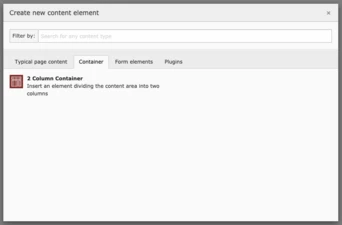 Figure 2: Our new container element is added to the New Content Element Wizard automatically
All container elements are automatically added to this tab in the wizard by default. You can opt-out of this behavior for individual container elements if you need to. If you’re running TYPO3 v10, all automatically added container elements have the new “saveAndClose” option set to “true” (this, also, can be changed for each container—see Part 3 for details).
Once you have saved the newly created element you will see a simple two-column element within your other page content, allowing you to add further content elements within the left and right columns:
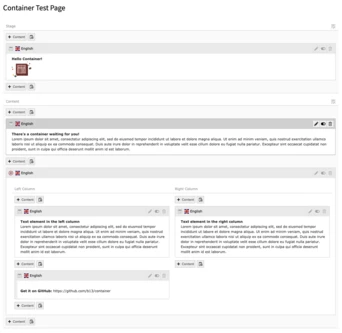 Figure 3: Example backend view of a page with our container element.
### Add Frontend output
We need to add a TypoScript configuration for our element, as well as a Fluid Template for the frontend output of this container.
Add this configuration to your TypoScript setup:
```
```
1
2
3
4
5
```
```
```
```
tt_content.2col-container =< lib.contentElement
tt_content.2col-container {
templateName = 2col-container
dataProcessing.13 = b13\Container\DataProcessing\ContainerProcessor
}
```
```
This snippet will invoke ContainerProcessor to process the child elements of each container area and make the content available for output in our Fluid Template. It also instructs TYPO3 to use a template called “2col-container” located in your template path for your content elements to render the frontend output (assuming your template root path is set in `lib.contentElement`).
If you debug the Fluid template, you will see that it contains everything you need (and would expect) to work with it:
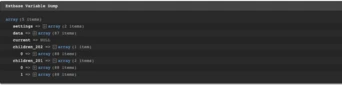 Figure 5: See the data you can work with in your container Fluid Template
You have all the data from the content element itself (read: the container element) as well as two variables containing the data from the child records. Every child record holds the complete database record of the child content element, including an additional key called “renderedContent,” which is a representation of that content type’s rendered content (of course!). In most cases you can use that to output individual container child elements as needed.
So, in our example, the Fluid frontend template would look something like this:
```
```
1
2
3
4
5
6
7
8
9
10
11
12
```
```
```
```
class="b_multicolumn b_multicolumn--twocols">
<div class="b_multicolumn__col">
<f:for each="{children_201}" as="element">
{element.renderedContent -> f:format.raw()}
f:for>
div>
<div class="b_multicolumn__col">
<f:for each="{children_202}" as="element">
{element.renderedContent -> f:format.raw()}
f:for>
div>
</div>
```
```
And with that, your two-column container element is ready to use.
That was fun, what now?
-------------------------
In [Part 3 of this series](https://b13.com/knowledge/flexible-containers-and-grids-for-typo3-part-three) we will look at a more complex example.
Considering Upgrading to TYPO3 v10?
-------------------------------------
Layout-relevant issues are just one of the areas you need to consider when planning an upgrade. We will be happy to help you analyze your projects for the whole gamut of upgradability challenges and opportunities.
[ Read more about TYPO3 Upgrades ](https://b13.com/services/typo3-upgrade)
### Written by:

b13 Founder and CEO, David, is someone you’ll meet if you’re thinking about working with our agency. He is constantly learning new skills and is an influential part of our cutting-edge frontend practice.
David Steeb CEO
[ more from David Steeb ](https://b13.com/team/david-steeb)
Related Articles
------------------
- 
### Digital Sovereignty Is More Than Where Your Data Lives
24 October 2026 | David Steeb
Notes from a roundtable at Open Source CMS 26: why governance and local expertise matter more for sovereignty than where your data is stored.
[ Read more: Digital Sovereignty Is More Than Where Your Data Lives ](https://b13.com/knowledge/digital-sovereignty-is-more-than-where-your-data-lives)
- 
### More Than Professional Growth
02 October 2026 | Jessica McQueen
Takeaways from CMS Camp 2026 in Mallorca: visual experiences, SEO and GEO, working with AI, and inclusive design. Plus a look at what editors need from a CMS, and why their…
[ Read more: More Than Professional Growth ](https://b13.com/blog/more-than-professional-growth-my-experience-at-cms-camp-2026)
- 
### T3ppy Gives TYPO3 a Friendly Face
06 August 2026 | Florian “Flix” Keitgen
TYPO3 is powerful—but it doesn’t have to feel impersonal. Meet T3ppy, our friendly companion for the backend.
[ Read more: T3ppy Gives TYPO3 a Friendly Face ](https://b13.com/knowledge/t3ppy-design-kit)
- 
### AI Content in TYPO3: Labelling Needs Accountability
02 August 2026 | Benni Mack
The EU AI Act brings the origins of AI-generated content into focus. AI Label marks AI-generated and AI-edited content in TYPO3 and records who signed off the published version—for…
[ Read more: AI Content in TYPO3: Labelling Needs Accountability ](https://b13.com/knowledge/ai-content-in-typo3-labelling-needs-accountability)
- 
### Better scalability with decoupled queues: How to set up RabbitMQ with TYPO3
10 April 2024 | Jochen Roth
When built-in message transports hit their limits, RabbitMQ can provide TYPO3 with a scalable, robust message queue.
[ Read more: Better scalability with decoupled queues: How to set up RabbitMQ with TYPO3 ](https://b13.com/knowledge/better-scalability-with-decoupled-queues-how-to-set-up-rabbitmq-with-typo3)
- 
### Meet T3ppy: A New Era for Editorial Work in TYPO3
01 April 2026 | Florian “Flix” Keitgen
T3ppy and the AiM extension bring AI directly into the TYPO3 backend—enhancing SEO, content quality, and workflows with centralized control.
[ Read more: Meet T3ppy: A New Era for Editorial Work in TYPO3 ](https://b13.com/knowledge/meet-t3ppy-a-new-era-for-editorial-work-in-typo3)
- 
### Why TYPO3 Needs a Marketplace for Products
25 March 2026 | Florian “Flix” Keitgen
A marketplace would make TYPO3 products more discoverable, easier to compare, and benefit both agencies and clients alike.
[ Read more: Why TYPO3 Needs a Marketplace for Products ](https://b13.com/knowledge/why-typo3-needs-a-marketplace-for-products)
- 
### Unlocking TYPO3’s Hidden Gem: The Backend User Section (Doktype 6)
05 March 2026 | David Steeb
Discover TYPO3’s underrated doktype 6 (Backend User Section) for secure internal previews, editor training, and prototyping. Learn real use cases, common pitfalls like 403 errors…
[ Read more: Unlocking TYPO3’s Hidden Gem: The Backend User Section (Doktype 6) ](https://b13.com/knowledge/backend-user-section-in-typo3-uses-pitfalls-helper)
- 
### Backend Previews With a System—Why We Built EXT:backendpreviews
09 February 2026 | David Steeb
EXT:backendpreviews brings structure and consistency to content previews in the TYPO3 backend using Fluid templates, layouts, and partials.
[ Read more: Backend Previews With a System—Why We Built EXT:backendpreviews ](https://b13.com/knowledge/backend-previews-with-a-system-why-we-built-extbackendpreviews)
- 
### The Internet Is No Longer Just for Humans—AI Bots Love Markdown
28 January 2026 | Benni Mack
Discover why most web traffic is now automated and how TYPO3’s structured content model prepares websites for humans, editors, and AI systems.
[ Read more: The Internet Is No Longer Just for Humans—AI Bots Love Markdown ](https://b13.com/knowledge/the-internet-is-no-longer-just-for-humans-ai-bots-love-markdown)