---
title: Easily download media assets from your TYPO3 instance
url: "https://b13.com/knowledge/direct-downloads-assets-and-media"
description: Sometimes you just need the original file. Version 11 means you can download multiple files and folders in a few clicks.
image: "https://b13.com/fileadmin/_processed_/3/8/csm_media-download_191-1_a71503a441.png"
date: 2021-12-10
modified: 2026-08-19
lastUpdated: 2026-08-19
---
# Easily download media assets from your TYPO3 instance
[ TYPO3 v11 ](https://b13.com/knowledge/typo3-v11)
Direct Downloads of Assets and Media
======================================
Celebrating the small but mighty Download button in the Filelist module!
Benni Mack
29 December 2021
[ RSS Feed ](https://b13.com/rss.xml)

The File List module has received a lot of attention in TYPO3 version 11. Among many other improvements, a new “Download” button is included. Your first thought might be “OK, what’s so special about this feature?”
This post is part of our TYPO3 Version 11 Series. We’re shining a spotlight on some of the really useful features in version 11 and why you should upgrade.
- [Link Sharing in TYPO3 v11](https://b13.com/knowledge/link-sharing-in-typo3-v11)
- **[Direct Downloads of Assets and Media](https://b13.com/knowledge/direct-downloads-assets-and-media)**
- [New CLI commands and better automation for Continuous Integration](https://b13.com/knowledge/new-cli-commands-better-automation-for-continuous-integration)
- [Resizable Navigation Area in TYPO3](https://b13.com/knowledge/resizable-navigation-area-in-typo3)
- [Multi-factor authentication ](https://b13.com/knowledge/multi-factor-authentication-in-typo3-11)
- [Search & Filter for Folders and Assets](https://b13.com/knowledge/search-filter-for-folders-and-assets)
- [Limit allowed attempts for logins in TYPO3 v11 ](https://b13.com/knowledge/limit-allowed-attempts-for-logins-in-typo3-v11)
- [Show Columns Selector in List View and File List View](https://b13.com/knowledge/show-columns-selector-in-list-view-and-file-list-view)
- [Multi Record Selection](https://b13.com/knowledge/multi-record-selection)
- [Keyboard Navigation for Module Menu & Context Menu](https://b13.com/knowledge/keyboard-navigation-for-module-menu-context-menu)
- [Workspaces Improvements](https://b13.com/blog/workspaces-improvements)
- [Consistent UX makes selecting items more intuitive](https://b13.com/knowledge/consistent-ux-makes-selecting-items-more-intuitive)
- [New TCA types in TYPO3 version 11](https://b13.com/knowledge/new-tca-types-in-typo3-version-11)
First, a little background. Websites consist of content. Content is made up of more than just text; it includes many kinds of assets like images, videos, PDFs and other documents. TYPO3 has a built-in component called the File Abstraction Layer (FAL), effectively single-sourcing a file so that once it is uploaded, editors can re-use it anywhere on a website. The Filelist module is where you manage your files and media assets in the backend.
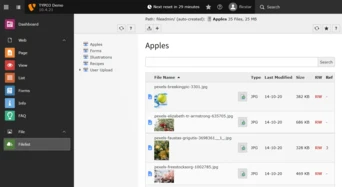 Screenshot of the Filelist module of the TYPO3 Demo project.
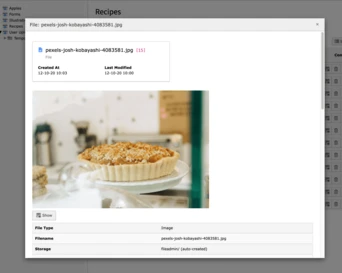
Since TYPO3 is more about managing uploaded assets, the download feature was previously somewhat hidden. In the past, downloading an image file for example, was quite a laborious task. From the Filelist module, you would first go to the “Info” popup, then click the “Show” button which would open the image in a new tab, from where you could then right-click the image and hit the “Save”.
 [ ](https://b13.com/fileadmin/Blog/typo3v11/Direct_Downloads/File_details.png)
The info popup window for an image, showing the Show button.
> This process is a day-to-day task for a lot of people, and being able to download content directly is now a possibility with TYPO3 Version 11.
Download files in a few clicks
--------------------------------
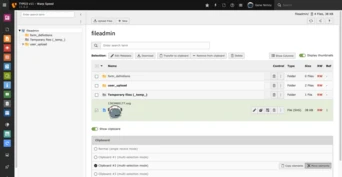
The download functionality has been brought to the surface so that it is more prominent in the Filelist module. When you select a file, the “Download” button is clearly visible along with the copy and paste, and edit features.
Now when you need the original asset in its original size, you can download it—with just one click. That’s better than the default functionality of your browser!
 [ ](https://b13.com/fileadmin/Blog/typo3v11/Direct_Downloads/Available_actions_in_file_list_module.png)
So what can you do with direct downloads?
-------------------------------------------
You want more? Paired with TYPO3’s new “multi-selection” feature in the Filelist module, you can select multiple files at once—just as in Windows Explorer or MacOS Finder. A new button at the top of the list lets you download all files as a zip file.
You might not need this feature right away, but if you’ll ever need it, TYPO3 v11 has you covered.
We’ve seen TYPO3 installations where the Filelist module contained a collection of invoice files, grouped per year in folders. The client can now quickly download these at once, with multiple folders (and their subfolders) downloaded as a zip file.
In another case we know of, a TYPO3 agency added an SFTP account for editors to use a third-party tool so they could download assets from TYPO3. Now they can disable this because the mass-download feature is exactly what they needed, even if they did not explicitly request this feature for TYPO3 version 11.
Be aware that when downloading a large set of files, server restrictions and PHP limits may apply.
Advanced options
------------------
You can configure TYPO3 so that certain editors only have the download button on a specific list of files, or even disable the feature altogether. This is all achieved by [User TSconfig](https://docs.typo3.org/m/typo3/reference-coreapi/11.5/en-us/ApiOverview/Tsconfig/Index.html):
```
1
2
3
4
5
6
7
8
```
```
options.file_list.fileDownload.allowedFileExtensions = docx,pdf
options.file_list.fileDownload.disallowedFileExtensions = pptx
options.file_list.fileDownload.enabled = 0
```
Want to start downloading your files?
---------------------------------------
TYPO3 version 11 will ship this feature automatically—you don’t need to activate anything, every editor can use it right away.
Upgrading to TYPO3 v11 from prior TYPO3 versions depends on the size and complexity of your web application. If you have trouble upgrading, we can help you out with our professional upgrade analysis to see how much work it is for you to upgrade.
Ready to upgrade your TYPO3 site?
-----------------------------------
[ Let’s connect ](https://b13.com/lets-connect)
### Written by:

b13 co-founder and TYPO3 CMS Core Development Lead, Benni Mack, heads our technical practices, setup and maintenance of our technical infrastructure, and coordinates our open-source contribution. His essential tool: TYPO3
Benni Mack CTO
[ more from Benni Mack ](https://b13.com/team/benni-mack)
Related Articles
------------------
- 
### New TCA types in TYPO3 version 11
23 January 2023 | Oliver Bartsch
In previous installments of our TYPO3 v11 series, we covered some of the great UX improvements that are making editors‘ lives easier. In this final post of the series, we’ve got…
[ Read more: New TCA types in TYPO3 version 11 ](https://b13.com/knowledge/new-tca-types-in-typo3-version-11)
- 
### Consistent UX makes selecting items more intuitive
20 July 2022 | Benni Mack
Previously in this series, we covered the improvements TYPO3 v11 brought to the Page Tree in the post, Resizable Navigation Area in TYPO3.
There is one feature in particular that…
[ Read more: Consistent UX makes selecting items more intuitive ](https://b13.com/knowledge/consistent-ux-makes-selecting-items-more-intuitive)
- 
### Workspaces Improvements
01 July 2022 | Benni Mack
One of TYPO3’s powerful features for content publishing is Workspaces—creating and staging in a draft environment before publishing content. TYPO3 v11 adds a few important touches…
[ Read more: Workspaces Improvements ](https://b13.com/knowledge/workspaces-improvements)
- 
### Keyboard Navigation for Module Menu & Context Menu
28 June 2022 | Oliver Bartsch
TYPO3 version 11 supports keyboard navigation as suggested by the ARIA Authoring Practices. Users don’t need a mouse to navigate menus, trees, and to select multiple records. This…
[ Read more: Keyboard Navigation for Module Menu & Context Menu ](https://b13.com/knowledge/keyboard-navigation-for-module-menu-context-menu)
- 
### Multi Record Selection
25 May 2022 | Oliver Bartsch
Working with multiple records just got easier. Copy, edit and delete multiple files at once with this improved feature in v11.
[ Read more: Multi Record Selection ](https://b13.com/knowledge/multi-record-selection)
- 
### Show Columns Selector in List View and File List View
15 March 2022 | Oliver Bartsch
We show you how to use the new Show Columns Selector in TYPO3 v11 so you can manage large sites with hundreds of pages, records and assets with ease.
[ Read more: Show Columns Selector in List View and File List View ](https://b13.com/knowledge/show-columns-selector-in-list-view-and-file-list-view)
- 
### Limit allowed attempts for logins in TYPO3 v11
25 February 2022 | Benni Mack
We talk about the rate limiting feature in TYPO3 v11 and the flexibility it offers for configuring backend login restrictions.
[ Read more: Limit allowed attempts for logins in TYPO3 v11 ](https://b13.com/knowledge/limit-allowed-attempts-for-logins-in-typo3-v11)
- 
### Search & Filter for Folders and Assets
10 February 2022 | Florian “Flix” Keitgen
No longer a poor cousin in the Page Tree. We give you a guided tour through the improvements made to the Folder Tree in TYPO3 v11.
[ Read more: Search & Filter for Folders and Assets ](https://b13.com/knowledge/search-filter-for-folders-and-assets)
- 
### Multi-factor authentication
01 February 2022 | Oliver Bartsch
Security has always been a key factor for TYPO3. To improve user account security, TYPO3 v11 includes an additional security feature called multi-factor authentication (MFA).
[ Read more: Multi-factor authentication ](https://b13.com/knowledge/multi-factor-authentication-in-typo3-11)
- 
### Resizable Navigation Area in TYPO3
19 January 2022 | Desirée Lochner
The Page Tree is one of the key concepts of TYPO3. In v11 it’s now easier than ever to adjust it just how you like it.
[ Read more: Resizable Navigation Area in TYPO3 ](https://b13.com/knowledge/resizable-navigation-area-in-typo3)